
Your Essential Website Project Plan

Think of a website project plan as more than just a glorified checklist. It's the strategic roadmap that guides every single decision, from the first brainstorm to the final launch. This document is what keeps your team, your stakeholders, and your budget all pointing in the same direction, preventing the kind of costly chaos that sinks so many great ideas.
Why a Real Plan Beats a Simple Checklist
Diving into a website build with just a to-do list is like setting off on a cross-country road trip with a destination in mind but no map. Sure, you might get there eventually, but you're bound to hit dead ends, run out of gas, and argue about which turn to take next. A formal website project plan is your GPS—it gives you clear direction, helps you anticipate roadblocks, and makes the whole journey a lot smoother.
Without this strategic guide, projects often fall prey to "scope creep." You know the drill: small, unplanned requests start piling up, and before you know it, you’ve blown past your deadlines and budget. A solid plan sets clear boundaries right from the start, protecting your resources and keeping everyone focused on the real goals. It's how you turn fuzzy concepts into concrete, achievable milestones.
The True Cost of Poor Planning
Skipping this foundational step can have some serious consequences. When teams are working without a shared vision, wires get crossed, leading to frustrating rework and endless delays. Stakeholders get nervous when they can't see clear progress, and the final website often misses the mark on the very business problems it was supposed to solve. A good plan is your best insurance policy against these all-too-common pitfalls.
A website project is a business initiative first and a technical project second. The plan is the bridge between the two, ensuring that every design choice and line of code serves a strategic purpose.
Believe it or not, your planning—or lack thereof—directly impacts the user experience, which is the ultimate measure of success. Don't just take my word for it; research shows that a staggering 88.5% of visitors will abandon a website if it loads too slowly. This is often a direct result of poor technical planning.
Other classic symptoms of a project that skipped the strategy phase include:
- Crowded web design (a turn-off for 84.6% of users)
- Confusing or hidden navigation menus
- A disconnect between what users want and what the site offers
If you want to dig deeper, you can check out more stats about website performance to see just how critical this upfront work really is.
To give you a clearer picture, here’s a quick overview of what a well-structured project flow looks like.
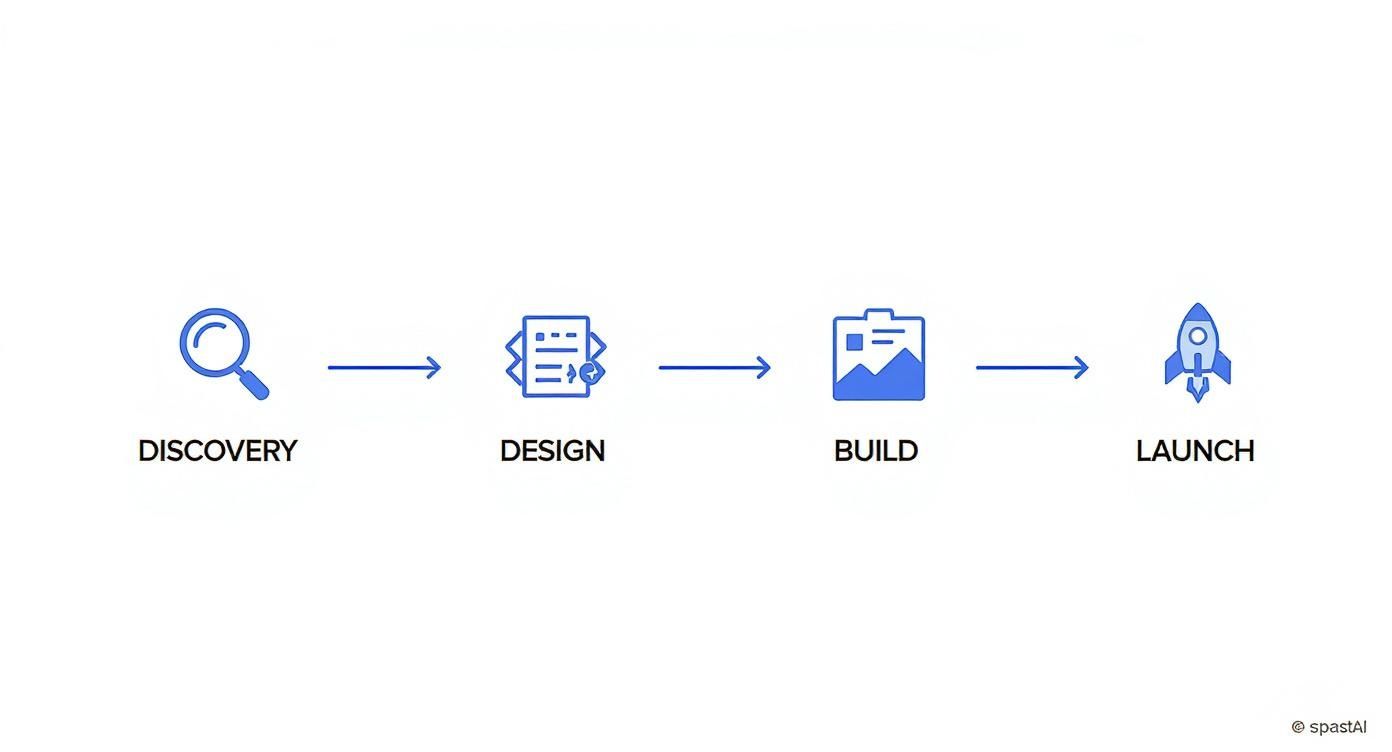
As you can see, each phase builds logically on the one before it. This isn’t just a random list of tasks. It’s a strategic sequence designed to minimize risk and ensure quality is baked in at every step. Discovery informs design, design guides the build, and a solid build sets you up for a flawless launch.
Core Components of a Successful Website Plan
To put it all together, a comprehensive website plan isn't a single document but a collection of phases, each with a distinct goal. This table breaks down the essentials.
Each of these stages is a critical piece of the puzzle, ensuring that what you build not only looks great but also delivers real value to both the business and its users.
Laying the Foundation with Discovery and Strategy
Every great website project starts long before anyone picks out a font or writes a single line of code. It all begins right here, in the discovery and strategy phase.
Honestly, this is the work that separates a website that actually moves the needle for your business from one that just becomes an expensive, pretty-but-useless digital brochure. Skipping this step is like building a house without a blueprint. Sure, you might end up with something that has walls and a roof, but it's probably not the house you actually wanted or needed.
Think of discovery as your detective phase. Your mission is to get past all the surface-level assumptions and figure out the real purpose of the website. It’s less about what you want the site to do and more about what you need it to achieve. This is where your website project plan starts to take shape, turning those big ideas into a concrete roadmap.
Setting Clear and Measurable Goals
First things first, you have to answer the big question: "What does success actually look like?" And sorry, "more sales" just doesn't cut it. You need to nail down clear, measurable goals that will act as your North Star for every decision you make from here on out.
For an e-commerce store, that might look something like this:
- Increase online leads from organic search by 20% within six months.
- Cut down on "Where's my order?" support tickets by 30% by launching a new self-service portal.
- Bump the average order value (AOV) from $75 to $90 by adding a product bundling feature.
See the difference? These goals are specific, you can measure them, and they have a deadline. They give you a real benchmark to judge the website's performance against after launch, so you can prove your investment was worth it.
Uncovering Real Needs Through Stakeholder Interviews
Once your high-level goals are set, it’s time to talk to people. And I mean everyone—your marketing team, the folks in customer service, the warehouse staff, and most importantly, your actual customers. The aim here is to understand their real-world problems and pain points, not just what they think they want.
Here's a pro tip: Don't ask stakeholders, "What do you want on the website?" That's a trap. Instead, ask, "What problems are you trying to solve in your day-to-day?" This little switch in phrasing gets you to the root of the issue.
I've seen it happen a dozen times. The sales team says they need a "better contact form." You dig a little deeper and find out the real issue is that their leads are completely unqualified. The solution isn't a prettier form—it’s a smarter, multi-step form that gathers crucial info or syncs directly with their Salesforce CRM to route leads correctly. Those are the kinds of insights that make a project truly successful.
Performing a Competitive Analysis
You’re not operating in a bubble. It's so important to know what your competitors are doing well and, even more revealing, where they're dropping the ball. This isn't about copying their website. It’s about finding those golden opportunities to make your brand and user experience stand out.
Take a hard look at 3-5 of your direct competitors and document what you find:
- User Experience: Is their site a breeze to navigate? Or is their checkout process a clunky nightmare?
- Key Features: Do they have cool features you're missing, like customer reviews, wishlists, or a loyalty program?
- Content and Messaging: How do they sound? What's their tone, and how are they pitching their value?
- Visual Design: What’s the general vibe? Does it look like it would appeal to the same people you're trying to reach?
Gathering this intel helps you make smart, strategic moves instead of just reacting to what everyone else is doing. It’s how you position yourself as a leader.
Creating the Project Scope Document
Okay, all this fantastic research needs to end up somewhere. That "somewhere" is the project scope document—easily one of the most critical documents you'll create. Think of it as your project's constitution. It spells out exactly what will be built and, just as importantly, what won't be.
A rock-solid scope document is your best defense against the dreaded scope creep—that endless trickle of "can we just add..." requests that can absolutely destroy your timeline and budget.
I was once on a project where a fuzzy scope led to a dozen unplanned feature requests right in the middle of development. The launch got pushed back by three months, and the budget ballooned by almost 40%. A detailed scope document, signed off by everyone, prevents that chaos by keeping the entire team aligned and focused.
Where Design and Content Finally Meet

Alright, you’ve got a solid strategy locked in. Now for the fun part: bringing your vision to life. This is where two massive, parallel efforts—design and content—finally start to converge and really shape how people will experience your brand online.
One of the most common mistakes I see in a website project plan is treating these as two totally separate assembly lines. They’re not. They are deeply connected, and nailing that relationship is absolutely critical for a successful launch.
Lots of people fall into the trap of thinking design comes first, and then you just slot the text into the pretty boxes later. That’s a surefire way to end up with a site that looks amazing but doesn't actually say anything meaningful. The best websites are always built with a "content-first" mindset. The words, the images, the videos—that’s the real substance, and it should absolutely inform the design, not the other way around.
From Blueprint to Interactive Prototype
The design process isn't about jumping straight into flashy mockups. It’s a deliberate journey, moving from rough, low-fidelity sketches to a fully interactive preview of your site, with user experience (UX) as the guiding star. This multi-stage process ensures the final product isn't just beautiful but is also intuitive and easy to navigate.
Here’s how it usually unfolds:
- Wireframes: Think of these as the basic architectural blueprints. They’re simple, black-and-white layouts that focus purely on structure, the hierarchy of information, and how a user will move through the site. There are no distracting colors or fonts here—it's all about the skeleton.
- Mockups: Once the wireframes get the green light, designers add the visual skin: colors, typography, imagery, and branding. Mockups give you a realistic (but static) preview of what the finished website will actually look like.
- Prototypes: This is where things get really exciting. Prototypes are interactive mockups that you can actually click through. This step is priceless for usability testing, as it lets you spot confusing navigation or awkward user flows before a developer writes a single line of code.
Investing in a thoughtful design and UX process isn't just a "nice-to-have" expense. It pays for itself many times over. The global web design market is on track to grow from $61.23 billion in 2025 to roughly $92 billion by 2030. A huge driver of that growth is the proven ROI of great UX. In fact, studies consistently show that for every dollar invested in UX, companies can expect a return of $100. It just goes to show the value businesses place on smart planning and execution. You can find more stats on the value of professional web design at AgencyHandy.com.
Planning Content That Actually Gets Results
While your design team is busy crafting the visual experience, the content work has to be happening at the same time. Your content plan needs to be just as meticulous as your design plan, mapping out every single page, blog post, product description, and call-to-action.
Your website is a conversation with your customer. The design creates the atmosphere, but the content is the actual conversation. Make sure it's a good one.
Kick things off by auditing any existing content you have and creating a sitemap. For every page on that map, define its one primary goal and the core message you need to get across. Put yourself in your customer's shoes: what do they need to see, read, or feel on this page to take that next step?
Here’s a simple, practical way to tackle your content planning:
- Define Your Voice and Tone: Are you playful and witty? Or more professional and authoritative? Get it down on paper so every piece of copy sounds like it came from the same brand.
- Create a Content Matrix: A simple spreadsheet is your best friend here. Map out each page, its target SEO keywords, the main call-to-action (CTA), and who’s on the hook for creating the content.
- Source Your Visuals Early: Don't leave finding photos, icons, and videos until the eleventh hour. High-quality visuals are just as crucial as the text and should be part of the plan from day one.
When you develop your content and design in tandem, you create a powerful harmony. The design supports and elevates your message, and the content has the perfect framework to shine. That synergy is what transforms a simple website into a powerful engine for growing your business.
Building and Testing Your Digital Experience

Alright, this is where the magic happens. All those discovery sessions, wireframes, and design mockups are about to become a real, functioning website. The build phase is when your development team takes the blueprints and starts laying the digital bricks, piecing together the front-end and back-end to create a living, breathing experience.
Even if you’re not a coder, it helps to understand the big picture. One of the first calls to make is on the tech stack. Are you going with a user-friendly Content Management System (CMS) like WordPress or Shopify? They’re fantastic for flexibility and ease of use. Or does your project have such unique needs that a completely custom-built solution is the only way to go?
As the code starts coming together, your role becomes that of a guide and reviewer. You’ll want to have regular check-ins and access to a staging server—a private version of the site—to see the progress firsthand. This lets you catch any misinterpretations of the design or scope early, long before they become bigger problems.
The Make-or-Break Phase: Quality Assurance
Once the build is "done," it's incredibly tempting to pop the champagne and hit the launch button. But hold on. I've seen more projects stumble at this stage than any other because they treated testing as a quick afterthought.
Think of QA not as a cost, but as an investment in user trust. Every bug you find before launch is a negative customer experience you’ve successfully prevented.
This is the most critical step for protecting your brand's reputation. A user who finds a broken link, a form that won’t submit, or a jumbled page on their phone won't care about the elegant code behind it—they'll just see a business that looks sloppy. This is your chance to find and fix those issues before your customers ever see them.
The tech world isn't standing still, either. By 2025, it's predicted that over 75% of businesses will be using AI-powered web tech, and 70% of new applications will be built on low-code platforms. While these tools speed things up, security can't be an afterthought—especially when over half of websites still have known vulnerabilities. This makes a rock-solid testing plan more essential than ever.
A Practical Testing Checklist
A thorough QA process isn't just about clicking around for a few hours. It’s a systematic hunt for anything that could go wrong. When you're dealing with e-commerce, for example, something as specific as mastering e-commerce payment gateway integration is crucial, as it's a frequent point of failure.
To do this right, your testing plan needs to cover a few key areas.
Functional Testing
This is the simple stuff: does it work?
- Links: Click every single one. Do they go where they're supposed to? Any 404s?
- Forms: Fill out every form—contact, newsletter, checkout. Do they submit? Do you get the right confirmation or error messages?
- Interactive Bits: Play with the dropdowns, image carousels, and pop-ups. Make sure they behave as expected.
Usability and Browser Testing
Your website has to work for everyone, on every device.
- Cross-Browser Check: Open the site in the latest versions of Chrome, Firefox, Safari, and Edge. Things can look surprisingly different between them.
- Responsive Design: This is huge. Drag your browser window from wide to narrow. Pull the site up on your phone, your partner’s phone, and a tablet. Does it look and work great everywhere?
- Navigation: Hand it over to someone who has never seen the site before. Can they find the "About Us" page or figure out how to buy something without your help?
Performance and Security Testing
These are the behind-the-scenes checks that can make or break user trust.
- Page Speed: Nobody waits for a slow website. Use a tool like Google PageSpeed Insights to check your load times. Shave off every second you can.
- Security Scans: Look for common vulnerabilities, particularly on pages that handle personal information or payments.
By methodically going through a checklist like this, you’re not just finishing a project; you’re building confidence that your site is truly ready for the real world. This detailed work pays off with a smooth launch and a fantastic first impression.
Preparing for a Flawless Launch and Beyond
You’ve made it. After all the design mockups, coding sprints, and content reviews, the finish line is finally in sight. But let’s be real—this last leg of the race is where a project either sticks the landing or stumbles. A smooth launch doesn’t just happen; it’s the result of meticulous, almost obsessive, coordination.
Getting your new site live is a huge win, but it’s not the end of the story. In many ways, it’s just the beginning. This is where we shift from building the thing to making the thing work for the business.
The Essential Pre-Launch Checklist
Before you even think about popping the champagne, you need to run through a final, comprehensive check. This isn't the time to rush. This checklist is your safety net, catching the small details that can cause major headaches on day one and damage that all-important first impression.
Think of it as the final pre-flight check. Here’s what absolutely needs to be on your list:
- Final Content Review: Get fresh eyes on every single page. All final text, images, and videos should be in place. Hunt down any lingering typos, broken image links, or weird formatting issues.
- Set Up 301 Redirects: If you're replacing an old site, this is non-negotiable. You need to map every old URL to its new home. This is critical for keeping your SEO juice and stopping visitors from hitting dead-end 404 pages.
- Configure Analytics: Make sure your tools, like Google Analytics, are installed correctly and—more importantly—tested. Set up your conversion goals now so you can track success from the very first click.
- Backup Everything: Perform a complete backup of the website files and the database right before you go live. If something goes sideways, this backup is your "undo" button.
This kind of detailed prep inside your website project plan is what separates the pros from the amateurs. It’s all the careful, behind-the-scenes work that makes the launch itself look effortless.
To keep everything organized, a simple table can be a lifesaver. It gives you a clear, at-a-glance view of what's done and what's still outstanding, ensuring nothing slips through the cracks.
Essential Pre-Launch Checklist
Having a visual tracker like this makes it easy to coordinate with your team and gives stakeholders confidence that you've covered all your bases. It turns a potentially chaotic process into a calm, methodical one.
Shifting from Project to Product
The second your site is live, your role fundamentally changes. You're no longer just managing a project with a defined end date; you're now the steward of a living, breathing digital product. The work pivots from building and deploying to monitoring, learning, and iterating based on how real people are actually using it.
Your website is not a static brochure; it’s a dynamic tool for your business. The post-launch phase is where you listen to your audience and use their feedback to make that tool even sharper.
Right after launch, you need to be glued to your analytics. Watch for any red flags—a strangely high bounce rate on your new homepage, a sudden drop in conversions, or error spikes. These are the early signals that something isn’t quite right. I also highly recommend setting up uptime monitoring to get an immediate alert if your site ever goes down.
Handling Post-Launch Bugs and Feedback
I’ll let you in on a secret: no launch is perfect. No matter how much you test, a few small bugs will always sneak through once your site is out in the wild with thousands of users on different browsers, devices, and internet connections. It’s normal. The key is having a solid plan to tackle them quickly.
Set up a clear system for catching feedback and bug reports:
- Create a Central Hub: Don’t let bug reports get lost in emails or Slack messages. Use a simple spreadsheet, a Trello board, or a proper ticketing system to log every single issue.
- Prioritize Ruthlessly: A typo on the “About Us” page is annoying, but a broken checkout button is a five-alarm fire. Triage every issue—is it critical, high, medium, or low priority?
- Communicate Clearly: Have a process for assigning fixes to your dev team and a workflow for testing and deploying those patches without taking the live site down.
This structured approach keeps you from panicking and ensures problems are fixed in a calm, controlled way.
Finally, remember that a website is never truly "done." Software needs updating, security threats evolve, and your business goals will change. A good ongoing maintenance plan is your best friend, ensuring the investment you just made continues to deliver value long after the launch-day excitement has faded.
Common Questions About Website Project Planning
https://www.youtube.com/embed/ZC37jl0lRF8
Even the most meticulously crafted roadmap is going to have a few questions pop up along the way. That’s just the nature of a complex project. While a good plan should answer most of them, some questions are so common that they deserve their own spotlight.
Think of this as your go-to FAQ for navigating the real-world hurdles of getting a website from idea to launch. Getting ahead of these now will save you a ton of headaches and help you manage everyone’s expectations.
How Long Should the Planning Phase Really Take?
This is the classic "how long is a piece of string?" question, but I can give you some solid, experience-based benchmarks. How much time you invest upfront in discovery and planning has a massive impact on how smoothly the rest of the project goes. Don't rush this part. A hurried plan is almost always a recipe for expensive mistakes later.
Here’s a realistic look at what to expect:
- Small, Simple Websites (5-10 pages): For a basic "brochure" style site with just a few standard features, you can get the discovery and planning done in about 1 to 2 weeks. This usually covers initial stakeholder interviews, defining goals, and drafting a core scope document.
- Complex Corporate Websites: If your site needs more firepower—like API integrations, custom calculators, or deep resource libraries—you need to dig deeper. The planning for a project like this will likely take 3 to 5 weeks.
- Large E-commerce Platforms: Building a full-fledged online store with thousands of products, custom checkout flows, and multiple system integrations? The planning is intense. Be prepared to dedicate 6 to 10 weeks, or even more, to get the strategy and technical scope absolutely right.
The golden rule I always come back to is this: every hour spent in planning saves roughly three hours during development and testing. It's the highest-leverage activity you can do.
What Are the Most Common Planning Pitfalls to Avoid?
I've seen even the most seasoned project managers fall into a few familiar traps. Just knowing what they are is half the battle. Honestly, most of these problems boil down to a breakdown in communication or not setting firm boundaries from the get-go.
Keep an eye out for these four project-killers:
- Scope Creep: This is the big one. It never starts with a huge request. It's the slow, constant trickle of "oh, can we just add this one little thing?" Without a formal change process, these "little things" will absolutely torpedo your budget and timeline.
- Poor Communication: When stakeholders, designers, and developers aren't talking or are working from different assumptions, expensive misunderstandings are guaranteed. A solid plan must include a clear communication rhythm and a single source of truth for all project documents.
- Unrealistic Timelines: It's so easy to underestimate the time needed for the less glamorous phases, especially content creation and thorough QA testing. This is a frequent mistake that leads to rushed work and a buggy, subpar final product.
- Forgetting About "After": Your project doesn’t end when the site goes live. A huge error is failing to plan and budget for what comes next—essential maintenance, security updates, and the marketing needed to actually drive traffic to your new site.
What Are the Best Tools for Managing the Plan?
There's no single "best" tool—the best tool is the one your team will actually use. The most important thing is to centralize everything in one place that everyone can easily access. Consistency trumps fancy features every single time.
That said, here are a few battle-tested options that teams lean on for different parts of the process:
- Overall Project Management: For the big picture of tasks, timelines, and milestones, you can't go wrong with industry favorites like Asana, Trello, or Monday.com.
- Design & Prototyping: When it's time to create wireframes and build interactive mockups, most design teams live in Figma or Sketch.
- Collaborative Documents: For things like your scope document, content outlines, and strategy briefs, simple is often best. Google Docs or Notion are perfect for real-time collaboration and feedback.
How Do You Handle Unexpected Changes Mid-Project?
Let’s be real for a second: change is going to happen. A key stakeholder will have a flash of inspiration, or market conditions will shift. The goal isn’t to prevent all change, but to manage it so it doesn't create chaos. This is where a formal Change Control Process becomes your best friend.
When a new request lands on your desk, don't just give a gut-reaction "yes" or "no." Instead, walk it through a simple process:
- Document the Request: First, get it in writing. What is the exact change being asked for?
- Analyze the Impact: Next, figure out what this really means. How will it affect the project's scope, timeline, and budget?
- Get Approval: Finally, present that analysis to the key stakeholders. They need to see the trade-offs clearly and sign off on them (e.g., "We can add this feature, but it will push the launch back by two weeks and add $5,000 to the budget. Do we want to proceed?").
This approach turns frantic, off-the-cuff requests into calm, structured business decisions.
Ready to stop worrying about your website and start focusing on growth? At Wand Websites, we build high-performing e-commerce stores designed to turn your hard work into more traffic and bigger sales. Let us handle the technical heavy lifting so you can get back to what you do best.
Learn more about our stress-free website solutions at Wand Websites
