
Starting a shopify store: Launch, Optimize, and Grow Your Online Shop

Launching a Shopify store can take your Etsy shop from a side gig to a scalable business in just a few hours. You’ll tap into a robust platform built for growth, with straightforward integrations and tools designed to fuel your next level of success.
Understanding Key Benefits Of Starting A Shopify Store
When you make the leap, you’re joining 5.8 million live stores (out of 9.7 million ever created) that have collectively processed over $1 trillion in sales. That track record means you’ll benefit from a rock-solid infrastructure that stays online even during major traffic spikes. For a deeper dive into these figures, check out Sumtracker’s Shopify Statistics.
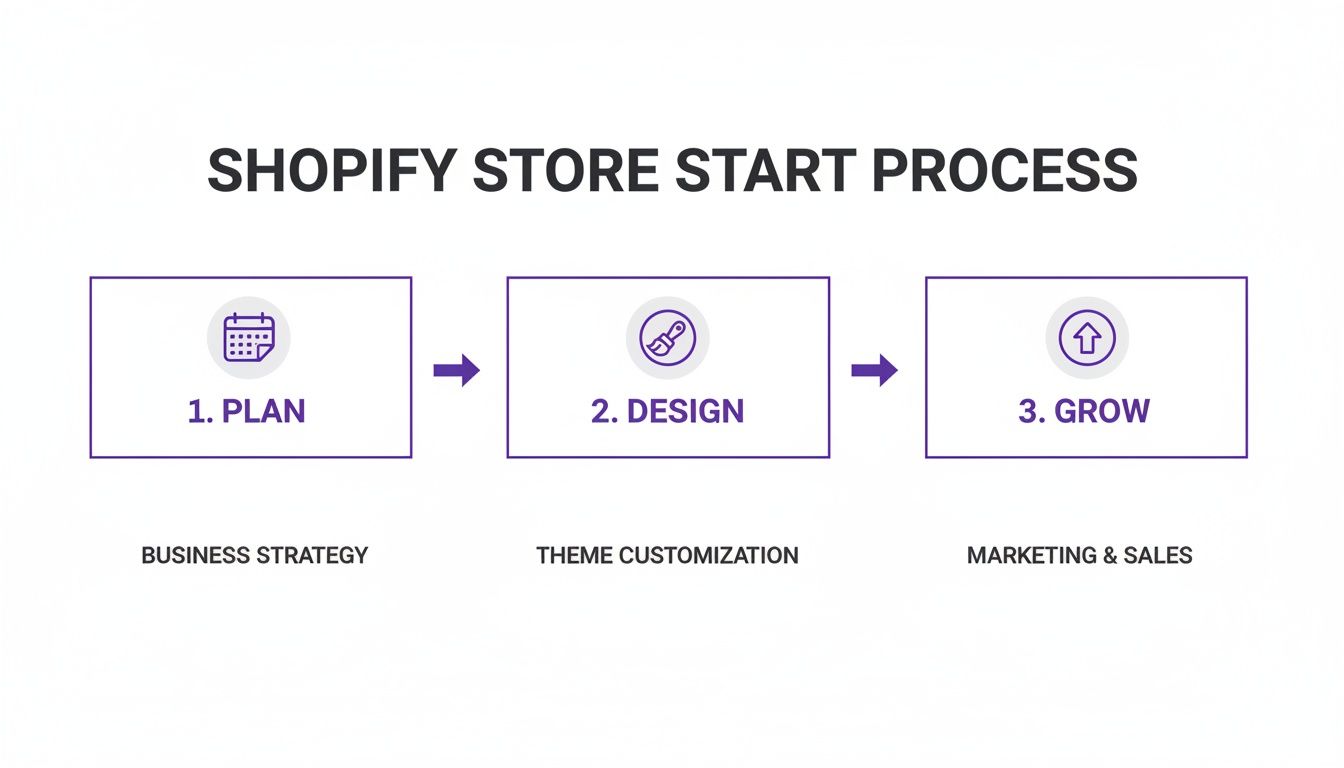
Here’s a quick roadmap to guide your early days:
Quick Start Overview
Use this table as a cheat sheet for the essential phases and outcomes when launching your new store:
Keep this overview at your desk as you move from planning to ongoing growth. It’s your bird’s-eye view of every milestone.
Below, you’ll see how merchants gain an edge on their competition:
- Speed: Instant hosting and setup get you selling right away.
- Design Control: Drag-and-drop themes let your unique brand shine.
- Global Reach: Built-in multi-currency checkout and international shipping.
- Seamless Apps: Over 6,000 integrations for marketing, inventory, analytics, and more.
“Switching from Etsy to Shopify doubled our traffic within two weeks,” recalls a craft jeweler.
That snapshot of Shopify’s admin dashboard shows how clear navigation and instant access to sales metrics can keep you focused on what matters—growing your store.
Key Platform Advantages
Moving from Etsy can feel overwhelming, but Shopify offers tools to preserve your hard-earned SEO and customer traffic. One seller mapped her old URLs to new pages in under 10 minutes—and kept her spot in Google’s top three results. Now she spends less time troubleshooting and more time fine-tuning her product pages.
Practical tips to smooth your transition:
- Automate redirects to maintain search rankings.
- Use bulk editors to move product data in one go.
- Test critical pages on mobile and desktop before launch.
These small steps prevent hiccups and keep sales rolling in from day one.
Real Merchant Stories
Sarah migrated 200 listings overnight—no downtime. By matching tags and URLs exactly, she saw a 25% sales bump within two weeks.
Carlos set up automated emails for abandoned carts. His recovery rate jumped to 40%, adding an extra $5,000 to his monthly revenue.
Key takeaways from their experience:
- Automate repetitive tasks to reclaim hours in your week.
- Mirror your existing SEO setup for a seamless shift.
- Keep an eye on analytics and tweak based on real-time data.
Growth comes from consistent, daily improvements rather than big, risky moves. With a clear plan and the right tools, you’ll build a Shopify store that not only replaces your Etsy shop but takes it to a whole new level.
Initial Shopify Store Setup
Getting your Shopify account live only takes a few clicks and zero coding skills. In under an hour, you’ll have the basics in place—from choosing a plan to locking down your domain. This section walks you through each key step so you can hit the ground running.
Choose Your Shopify Plan
When you’re sizing up options, think about where your business stands today and where you want to go next.
- Basic Plan: Essential features for new sellers
- Shopify Plan: Detailed reporting and growth tools
- Advanced Plan: Lower transaction fees and custom reports
Compare monthly fees, transaction rates, and which sales channels each plan unlocks. Upgrading later is seamless once you hit new revenue or traffic milestones.
Secure Your Domain
A clean, easy-to-spell domain builds trust right away. Avoid hyphens and numbers. Ask a friend to spell it back to you—if they nail it on the first try, you’re in good shape.
A clear domain name boosts brand recall and trust
Configure Store Settings
Fine-tuning settings now saves headaches later. Make sure your tax rules, shipping zones, and checkout language match where your customers live.
Store Settings Checklist
- Business address and contact email
- Tax collection setup for each region
- Multi-currency turned on for cross-border sales
- Custom checkout fields and account preferences
Migrate Products And Preserve SEO
Moving hundreds of listings from Etsy? I did that last spring and kept every SEO metric intact by following a clear process.
- Install a migration app like LitExtension
- Export your current listings as CSV
- Map old URLs to your new Shopify pages and set up 301 redirects
- Verify redirects in Google Search Console after launch
That way, your search rankings stay steady and your past traffic keeps flowing in.
Set Up Payment Options
Smooth checkout = fewer abandoned carts. I always activate multiple gateways to match shopper preferences.
- Shopify Payments: no extra gateway fees and fast payouts
- PayPal: a familiar choice that customers trust
- Stripe: handles custom payment methods and regional cards
One key fact: merchants on Shopify contributed over $440 billion to the global GDP in 2023, with lifetime sales topping $1 trillion. And today there are 5.6 million active Shopify sites across 175 countries—adding instant credibility to your store.
Read the full research about this impact at RedStag Fulfillment.
Dashboard Shortcuts And Tools
Here’s how Shopify CLI simplifies theme tweaks—no manual uploads required.
You’ll see in the screenshot how a quick terminal command pushes changes live. Perfect for testing design edits on the fly.
Enable Essential Apps
Installing the right apps can turn an okay store into a high-converting machine:
- SEO optimizer to automate meta tags
- Abandoned cart recovery app for 40% average recovery rates
- Currency converter to improve international checkout experience
Final Checklist And Tips
Before you go live, run through every step on desktop and mobile. Ask a few friends to place dummy orders and flag anything odd.
- Review mobile layouts, button sizes, and image loads
- Double-check shipping rates with sample orders
- Confirm tax calculations for each region
Expert Insight
“Building your store on Shopify means you spend less time troubleshooting and more time growing,” says an e-commerce strategist
Once you’ve ticked off this list, your Shopify store will be primed for launch. Next up: crafting a storefront design that turns visitors into loyal fans.
Designing Your Shopify Store That Converts
Friction-free navigation begins with a clean layout. On average, a thoughtful page structure can drive a 30% boost in add-to-cart clicks for small sellers.
Craft-focused entrepreneurs often weigh free picks like Debut or Dawn against premium options such as Turbo. Each theme brings its own perks when it comes to guiding shoppers toward checkout.
Theme Feature Comparison
Here’s a quick glance at some popular themes and what they offer:
This breakdown shows why many stores invest in premium themes—built-in trust badges and flexible sections often make the extra cost worthwhile.
Applying Color Psychology And Fonts
Button hues matter more than you might think. Warm shades like orange have lifted click rates by 20% in controlled tests.
Pairing a serif heading with a clean sans-serif body font also boosts readability. Clear text keeps visitors around longer and encourages deeper browsing.
- Test contrasting button colors (green, blue, orange) over a couple of weeks.
- Stick to 16px for body text and 24px for headers for optimal legibility.
- Feature your bestsellers at the top of the product grid to capture immediate attention.
One maker moved new arrivals above the fold and saw a 25% jump in views.
Testing Home Page Layouts And Widgets
Experimenting with grid styles and widget placement reveals what resonates most with your audience. Keep each A/B test focused on a single element to avoid muddy results.
“Small changes in layout can yield a 10-20% conversion lift,” says an experienced Shopify designer.
The screenshot below shows Shopify’s theme library with filters and live previews. You can quickly spot mobile layouts and customization controls that fit your brand.

From here, you can:
- Add review widgets to build instant credibility (one shop saw a 15% boost in conversions).
- Create banner graphics featuring real customer photos—this alone lifted click-through rates by 18%.
- Highlight seasonal or high-margin products with a contrasting background section.
Bringing it all together, start with a mobile-first theme, layer on your brand colors, choose legible fonts, and organize products thoughtfully. Then, sprinkle in trust signals—badges and star ratings—and let data guide your tweaks.
Consistent design refinements can compound into a 50% revenue increase over time.
With this framework, you’ll craft a storefront that not only looks great but smoothly turns browsers into buyers.
Setting Up Payments And Shipping Rules
Building trust at checkout is non-negotiable. Shoppers hesitate to hand over card details if anything feels off. I once helped a small jewelry brand roll out 10 currencies across multiple gateways—and they watched cart abandonment drop by 15% almost overnight. That kind of fine-tuning can lift your conversions, too.
Payment Gateway Setup
When you launch a Shopify store, those transaction fees can nibble away at profits. If you activate Shopify Payments right away, you’ll dodge extra gateway charges and get payouts in just two days.
For global reach, pair it with PayPal and Stripe. Compare each provider’s percentage fee and fixed cost in your home currency before committing.
Here are a few tactics that have worked well:
- Enable Shopify Payments first to keep extra fees at bay.
- Add PayPal and Stripe for international shoppers.
- Hook into Zapier or native integrations to sync orders automatically.
Flexible checkout options can bump up your average ticket size by 20%. I’ve seen stores double their high-value orders just by offering split payments.
- Turn on Afterpay (four interest-free installments) via Afterpay.
- Offer Klarna as another “buy now, pay later” choice through Klarna.
To help you decide, here’s a side-by-side look at fees and global reach for major gateways:
Payment Gateway Comparison
Below is a quick breakdown of transaction costs and supported markets for each option.
Choosing the right mix can shave costs and improve checkout speed—both of which keep customers clicking “Purchase.”
“Fewer checkout hurdles translate directly to higher sales,” says an eCommerce strategist.
Shipping Rules Strategies
Deciding between flat-rate and real-time quotes comes down to simplicity versus precision. Flat-rate is easy, but live carrier rates from USPS, UPS, or DHL inspire more confidence.
A boutique I coached started using pre-weighed mailers. By testing lightweight packaging in small batches, they cut shipping spend by 12% without risking product safety.
Here are a few tactics to try:
- Flat-rate tiers based on order totals
- Real-time quotes for precise customer pricing
- Free shipping thresholds to drive larger carts
Negotiating with carriers can yield hidden savings. Pull three months of parcel data, reach out to your rep, and ask for tiered discounts based on weight or destination. Then plug those rates into Shopify’s shipping settings.
Don’t forget local options—curbside pickup or same-city delivery can delight nearby shoppers and further trim costs. Monitor your monthly spend and tweak thresholds every quarter to stay on budget.
Automation And Syncing
Manual tasks can bog you down. Over the years, I’ve leaned on Shopify Flow to keep orders moving without extra clicks.
You might set up triggers for:
- High-value orders tagged for priority fulfillment
- Back-in-stock alerts sent via email or SMS
- Packing slip generation in your warehouse software
Pair Flow with a Google Sheets integration through Zapier, and you’ll spend less time on data entry—and more on refining your store.
Once your payment methods and shipping rules are in place, publish a clear policy outlining delivery windows, returns, and free-shipping offers. Prospective buyers will appreciate the transparency, and your support team will thank you for fewer repetitive questions.
Next up: polishing your checkout experience to remove friction, then diving into SEO tactics to bring in more organic traffic. Keep testing—small changes today lead to big wins tomorrow.
Happy selling and prosper!
Optimizing Shopify Store SEO For Growth
Tackling SEO can feel like running a marathon, yet you don’t have to wait months to see results.
I watched one artisan candle maker double their organic traffic in just three months. They honed in on mid-to-long-tail phrases and published a weekly blog post. Small technical tweaks and strategic content pushed their store forward.
They discovered queries like “soy wax lavender candles” pulling in 1,200 searches per month, then automated their meta tags with Shopify’s bulk editor—saving hours. The outcome? A 35% increase in click-through rate and hundreds of fresh visitors each week.
• Research niche-specific long-tail phrases based on search volume data.
• Bulk edit SEO titles and descriptions to maintain consistency.
• Optimize product pages with clear headings and relevant keywords.
Research High Value Keywords
Mapping products to precise search terms is your first move. Tools such as Ahrefs or Semrush (or free options like Ubersuggest) surface medium-difficulty phrases that real buyers search for.
Peek into Google’s “People Also Ask” to catch related questions—think DIY candle care or tips for layering fragrances. Writing blog posts around these topics opens new traffic channels.
“Focusing on subtopics around your main product can double impressions in just weeks,” says an SEO consultant.
Automate Meta Tags With Bulk Editor
Shopify’s bulk editor is a lifesaver when you need to standardize SEO fields across hundreds of listings. Build templates with variables for:
- {{ product.title }} dynamic page names
- {{ shop.name }} brand reinforcement
- {{ product.collection }} to highlight category
With a template in place, every product page follows best practices without manual data entry.
Implement On Page Optimizations
On-page fixes often deliver the quickest lift. Start by crafting unique H1 and H2 headings that align with your target keywords. Then, refine image alt text so it describes both the product and the search intent.
Don’t forget internal links—they guide shoppers from blog posts to product pages for scents you mention. This web of connections boosts dwell time and helps Google understand your site.
Key Insight
Small adjustments in headings and links can improve ranking positions by 14%.
Setup Local Landing Pages
If you ship internationally, create region-specific pages—France, Australia, South Africa—complete with localized content, testimonials, and pricing in local currency.
Checklist for local SEO:
• Geo-targeted URLs like /fr/ or /au/
• Translated meta tags and product descriptions
• Local business schema markup with address and phone
These pages rank better in country-specific searches and make buyers feel right at home.
Build Authentic Backlinks
Quality backlinks still matter, but they must come from real relationships, not link farms. Reach out to:
- Niche blogs in home decor or wellness
- Local press outlets for guest article opportunities
- Influencers in exchange for honest product reviews
Offering candle samples or expert tips in your pitch goes a long way. Organic backlinks from relevant sites boost both domain authority and referral traffic.
Use Top SEO Apps And Track Progress
Apps like Plug In SEO, Smart SEO, and SEO Manager can handle sitemaps, alt tags, and structured data automatically. Then, set clear monthly goals:
Regularly compare Shopify’s built-in reports with GA4 insights. Identify which pages drive the most sessions and tweak your content strategy accordingly.
Beyond these tactics, remember Shopify’s massive reach—over 175 countries, 5.8 million live sites as of 2025, 158 million monthly visits, and 199 million orders per month. Learn more about Shopify statistics on Ecommercetrix.
Consistent experimentation, tracking, and refinement will set the stage for lasting organic growth. With this roadmap, you’ll attract more visitors and turn them into loyal customers.
Shopify Store Launch Checklist And Growth Strategies
That launch-day buzz is electric, but it’s really just kickoff for the journey ahead. This roadmap lays out the final tests, promotional moves, and early growth tactics you need to maintain momentum from day one.
- Verify site speed and mobile layout across smartphones, tablets, and desktops.
- Confirm every payment method runs smoothly through checkout.
- Double-check shipping calculations and estimated delivery windows.
- Schedule your first round of newsletters and social posts to hit at launch.
Pre Launch Final Checks
It’s worth running one more end-to-end purchase yourself—add items to cart, check out, and watch for any hiccups in confirmation emails.
Invite a few friends or colleagues to play shopper: they’ll spot mismatched product variants, odd shipping labels, or discount codes that don’t apply.
And don’t forget those SEO redirects. Properly routing traffic from your old Etsy listings (or any previous URLs) prevents ranking drops and keeps search visitors flowing in.
Launch Day Promotions
When your store goes live, fan the flames of excitement:
- Send an email announcing your top picks with limited-time deals.
- Share vibrant images and countdown stickers in Instagram and Facebook Stories.
- Pin a bold banner on your homepage with a clear call to action.
- Tag partners or influencers and pepper in relevant hashtags.
A short flash sale can ignite urgency without slashing your margins. Try tiered discounts or small-batch bundles, and always include an explicit end time.
Gathering And Showcasing Reviews
Nothing beats authentic social proof to push hesitant shoppers over the line. Reach out to your first customers—offer a small freebie or store credit in exchange for honest feedback.
Highlight those reviews front and center:
- Feature customer photos alongside quotes on product pages.
- Build a dedicated testimonial section on your homepage.
“Featuring real customer photos lifted conversions by 18% overnight,” shares a boutique owner.
Post Launch Growth Tactics
Once you’re live, let automation carry the load. Set up:
- Welcome sequences that share your brand story and bestsellers.
- Abandoned-cart emails with progressively more enticing offers.
- Post-purchase follow-ups offering tips or related items.
Introduce a loyalty program to reward repeat orders and referrals. Bundle complementary products at a slight discount to nudge up average order value. Sprinkle in upsell pop-ups during checkout for a last-minute boost.
Segment your audience based on past purchases or browsing habits. That alone can lift repeat revenue by 15-25%.
“Automated email flows recovered 25% of lapsed customers in our first month,” reports a shop owner.
Surprise VIPs with early access to new drops or exclusive bundles. Small gestures build big loyalty.
Paid Ads Vs Organic Community
Where should you pour your budget? It depends on your goals and timeline.
Paid ads deliver instant traffic to custom audiences, but they demand ongoing spend. Organic tactics—content marketing, niche Facebook groups, micro-influencers—often foster deeper brand loyalty without per-click costs.
- Paid ads: quick reach, precise targeting, immediate feedback.
- Organic community: long-term engagement, UGC, word-of-mouth referrals.
- Micro-influencers: drive 20% engagement on tight budgets.
Keep close tabs on ROI and attribution. Shift dollars toward the campaigns that truly move the needle.
Partnering With Micro Influencers
Micro creators can expand your audience without draining your budget. Look for those with under 50K followers and high engagement rates.
- Provide product samples or store credits for honest reviews.
- Set up unique discount codes to track each collaboration.
- Host Instagram takeovers or live demos to highlight features in real time.
- Repost co-created content on your own channels for extra authenticity.
These partnerships often yield 2-3x higher engagement versus larger influencers. Use UTM parameters to measure impact and agree on clear deliverables up front.
Continuous Testing And Iteration
Growth never stalls when you build testing into your routine. Every two weeks, review A/B test results and customer feedback from surveys or live-chat logs.
- Record ideas in a shared doc so everyone stays aligned.
- Attack the fixes that promise the highest impact for the least effort.
- Celebrate small wins and tweak your roadmap accordingly.
- Scan support tickets for recurring pain points.
This feedback loop keeps you agile and ready to adapt, ensuring your store continues thriving well beyond launch day.
FAQ
Launching a Shopify store usually sparks a few big questions. One of the most common: how long does migrating from Etsy actually take? From talking with sellers, most finish the transfer in 48–72 hours using bulk CSV tools.
To move faster:
- Automate URL redirects so old Etsy links don’t break.
- Map tags and collections carefully to preserve your site’s filters.
- Preview every record before going live to catch errors early.
For instance, Carol shifted 150 products overnight without losing any traffic.
Smooth Returns And Fair Policies
Returns don’t have to be a headache. A clear, step-by-step policy builds trust. Outline your return window, acceptable conditions, and refund timelines. Then plug in an app like Returnly to handle restocking and customer notifications automatically.
That way, you’re not buried under manual emails every time someone hits “return.”
“We kept our returns rate under 3% after clarifying our rules,” shares a boutique owner.
Scaling Beyond A Thousand Products
Once your catalog grows beyond a few hundred items, manual edits slow you down. Tools like Excelify or Matrixify let you batch-update prices, swap hundreds of images, and tweak tags in seconds.
Table of Organizer Options
Keep this FAQ bookmarked for quick fixes whenever you hit a snag.
Ready to transform your side hustle? Partner with Wand Websites and simplify starting a Shopify store.
