
seo software for small business: top tools & tips

Welcome! If you're a small business owner, trying to get noticed online can feel a lot like shouting into the wind. But what if you had a megaphone? That's exactly what SEO software is. This guide will cut through the confusing jargon and show you how these tools act as your digital compass, pointing you straight to more customers.
Why SEO Software Is a Game Changer
Think of your website as your digital storefront. Without search engine optimization (SEO), it’s like being tucked away on a quiet backstreet with no signs pointing the way. SEO software is the tool that draws the map, puts up the bright, flashing signs, and even provides the loudspeaker to bring a steady stream of customers right to your door.
This isn't just about getting more traffic; it’s about attracting the right kind of traffic. For a small business, that distinction is everything. You don't have a massive budget to throw at marketing that doesn't work. The right seo software for small business helps you go toe-to-toe with bigger companies by laser-focusing your efforts where they'll make the biggest splash.
From Guesswork to Growth
Let’s be honest, without the right tools, SEO can feel like a guessing game. You publish a blog post and hope it ranks. You tweak a headline and cross your fingers. SEO software takes all that guesswork and replaces it with a solid, data-driven strategy. It shows you exactly what your customers are searching for, how your competitors are winning, and the specific moves you can make to climb the rankings.
This powerful shift is why the global market for these tools is exploding, with small and medium-sized businesses (SMEs) leading the charge. It's no surprise; in a crowded online world, being visible is non-negotiable. You can dig into more market data over at Precedence Research.
In short, SEO software takes confusing data and turns it into a clear, step-by-step action plan. It tells you what keywords to target, which pages need a tune-up, and where you're already crushing the competition.
The Core Benefits for Your Business
Putting an SEO platform to work for you delivers real, tangible results that are about so much more than just rankings. It gives you the power to make smarter decisions and get every ounce of value from your online presence. To get a better feel for the big picture of online visibility, a deep dive like this Ultimate Guide to Ecommerce SEO is a great place to start.
So, what do these tools actually do for you? Here's a quick look at the direct value they bring.
Quick Overview of SEO Software Functions for Small Business
This table breaks down what these tools do behind the scenes and how that translates into real-world benefits for your business.
Ultimately, each of these functions works together to give you a complete picture of your online performance and a clear path to improvement.
Here’s a summary of the key advantages:
- Saves Countless Hours: Automates the grind of tracking keyword positions and checking for site errors.
- Provides Actionable Insights: Turns complex data into simple, "do-this-next" recommendations.
- Levels the Playing Field: Gives you the same competitive intelligence the big guys use, letting you find and exploit gaps in their strategy.
- Maximizes Your ROI: Makes sure your marketing dollars are spent targeting customers who are already searching for you.
What’s Under the Hood? The Five Must-Have SEO Features
So, what exactly do these SEO platforms do? The best way to think of SEO software is like a Swiss Army knife for your website. It’s loaded with specialized tools, each designed to tackle a specific piece of the puzzle. Getting a handle on these core features is the first step to picking the right SEO software for your small business.
Let's break down the five most important tools you'll find. I’ll skip the dry, technical jargon and explain what they are, what they do, and most importantly, how they help you get found by more customers.
1. Keyword Research: Reading Your Customers’ Minds
This is the absolute bedrock of good SEO. Keyword research is all about figuring out the exact words and phrases your potential customers are typing into Google. It's not about guessing; it's about using real data to understand their needs.
A solid keyword research tool helps you uncover these valuable search terms. It will show you how many people search for a term each month (search volume) and how tough it will be to show up on the first page for it (keyword difficulty).
The goal is to find that sweet spot: terms people are actually searching for, but that aren't so competitive you stand no chance. For small businesses, this often means focusing on long-tail keywords—those longer, super-specific phrases. Think "handmade leather dog collars in Austin" instead of just "dog collars." Someone searching that phrase knows exactly what they want and is much closer to buying.
2. Rank Tracking: Your SEO Scoreboard
If keyword research is your game plan, rank tracking is the scoreboard that tells you if you’re winning. This feature automatically keeps an eye on your website's position in Google’s search results for all your target keywords. Without it, you’re just guessing.
Honestly, doing SEO without a rank tracker is like trying to train for a marathon without a stopwatch. You have no idea if you're getting faster or slower. Rank tracking gives you that crucial feedback, showing you what’s working, what’s not, and where you need to adjust your strategy.
Think of it this way: Rank tracking provides the proof. It visualizes your progress, showing how your site is climbing the search results for the keywords that actually drive your business forward.
3. Site Audits: A Health Check for Your Website
A site audit tool is like a mechanic giving your website a full diagnostic scan. It crawls every single page—just like a Google bot would—to find technical glitches that are silently hurting your rankings. These are problems you'd likely never spot on your own.
This tool flags all sorts of common issues that can hold you back, like:
- Broken Links: Dead-end links that frustrate visitors and send bad signals to Google.
- Slow Page Speed: Pages that take forever to load are a huge turn-off for users and a known ranking factor.
- Missing Meta Descriptions: Those little text snippets under your page title in search results. A good one convinces people to click on your link.
- Duplicate Content: Having the same (or very similar) content on multiple pages confuses search engines and dilutes your authority.
Fixing these technical snags is often the "low-hanging fruit" of SEO. They’re usually straightforward to correct and can give you a surprisingly quick boost in visibility.
4. Backlink Analysis: Seeing Who Vouchers for You
In the world of SEO, think of backlinks as votes of confidence from other websites. When a respected site links to one of your pages, it’s basically telling Google, "Hey, this content is legit and trustworthy." The more of these high-quality "votes" you collect, the more authority your site builds.
Backlink analysis tools let you do two incredibly powerful things:
- Check Your Own Links: See exactly who is linking to you and which pages on your site are earning the most credibility.
- Spy on Your Competitors: This is the best part. You can see every single website that links to your competition. It's a goldmine for discovering new link opportunities for your own site.
By digging into this data, you can quickly figure out where your competitors are getting their authority and start building a strategy to get your own high-quality links.
The Real World Impact on Your Business
It’s great to understand what features like keyword research and site audits do, but let's talk about what really matters: how does SEO software for a small business actually help you grow? It’s all about turning that data into real-world results like more website visitors, a stronger reputation, and a healthier bottom line.
Think of SEO software as a magnet for the right kind of traffic. Instead of shouting into the void with expensive traditional ads, you’re putting your business right in front of people exactly when they’re looking for what you sell. It’s the digital equivalent of a customer walking into your store and asking for a specific product by name, rather than you making a hundred cold calls.
This means the people landing on your website aren't just window shoppers. They have a problem and are actively searching for a solution. By targeting the right keywords, you're essentially holding the door open for your ideal customers.
Building Authority and Trust
Climbing the search rankings isn't just about getting seen—it's about being trusted. When someone sees your website at the top of Google's results, it sends a powerful message: you're a legitimate leader in your field. We all do it; we automatically trust that Google is showing us the best and most relevant options first.
Being that top result instantly positions you as the go-to expert. This isn’t just about ego; it directly impacts sales. A customer weighing two options is far more likely to choose the one that Google has unofficially "endorsed" with a top spot.
SEO software takes the guesswork out of building your online credibility. It gives you a clear, data-driven plan to turn your website from a simple online brochure into a powerful, trust-building machine.
Achieving a Strong Return on Investment
For any small business, every single dollar has to count. One of the most convincing arguments for SEO software is the fantastic return on investment (ROI) it delivers. By taking over tedious jobs like tracking your rankings and monitoring backlinks, these tools give you back your most precious resource: time. You get to focus on strategy instead of getting bogged down in spreadsheets.
This efficiency is a game-changer for small teams. While large corporations currently account for over 56% of the SEO software market revenue, smaller businesses are catching on fast. Affordable and powerful platforms have leveled the playing field, making it possible to run sophisticated SEO campaigns that were once only for the big guys. You can dig into more details about this growing market adoption on verifiedmarketresearch.com.
So, how does the software directly boost your ROI?
- It cuts down on wasted ad spend. By attracting high-quality organic traffic, you become less reliant on expensive pay-per-click (PPC) ads that stop working the second you stop paying.
- It brings in better customers. SEO helps you find and keep the right kind of customers—the ones who appreciate what you do, come back for more, and build genuine brand loyalty.
- It gives you priceless market insights. The competitor analysis tools are like having a secret agent, showing you what’s working for others and uncovering new opportunities for you to make smarter, more profitable decisions.
How to Choose the Right SEO Tool
Picking the right SEO software for your small business can feel like staring at a wall of TVs in an electronics store—they all look shiny and promising, but which one is actually right for you? The secret isn't finding some mythical "perfect" tool. It's about finding the tool that fits your business like a glove.
This all comes down to aligning your choice with your specific goals, your budget, and how much time you can realistically pour into it.
Think about it this way: are you a local bakery trying to get more people through the door for morning croissants, or an online t-shirt shop shipping nationwide? The bakery needs to crush it in local search, while the t-shirt shop is focused on e-commerce analytics and spying on competitors. Getting this crystal clear from the start saves you from paying for a bunch of fancy features you’ll never touch.
Before you even glance at a pricing page, take a moment. Grab a notepad and jot down your top three marketing goals. This simple exercise acts as your compass, guiding you to a tool that actually helps you, rather than one that just looks impressive.
Define Your Goals and Budget
First things first: what do you actually need this software to do? Your answer here will instantly slash the number of options you need to consider. If your main objective is to pop up in Google Maps when someone searches "coffee near me," then you absolutely need a tool with strong local citation management and Google Business Profile features.
Here are a few common goals I see with small businesses:
- Boost local visibility: Attracting more customers to your physical shop or office.
- Drive e-commerce sales: By ranking higher for the specific things people search for when they want to buy.
- Become a thought leader: Creating content that answers your audience's questions and establishes you as the go-to expert.
- Outrank a specific competitor: Analyzing what they're doing right and finding gaps in their strategy you can exploit.
Once your goals are set, it’s time for the budget talk. SEO software can run you anywhere from less than $50 a month to well over $500. Be honest about what your business can handle. The priciest tool isn't automatically the best, especially for a small business. A more affordable tool that you actually use consistently is infinitely more valuable than a high-end platform you’re too intimidated to open. As you explore, don't forget to check out some of the newer AI-powered SEO tools, which can pack a serious punch without breaking the bank.
All-in-One Platforms vs. Specialized Tools
Next up, you have a big decision to make: do you want an all-in-one platform or a collection of specialized tools? Think of it as the difference between a Swiss Army knife and a dedicated set of professional-grade wrenches. The multi-tool gives you a little bit of everything, while the wrenches are designed to do one job perfectly.
An all-in-one platform, like Semrush or Ahrefs, bundles everything together—keyword research, rank tracking, site audits, and backlink analysis are all under one roof. This is fantastic for simplicity and getting that 30,000-foot view of your SEO health.
For instance, a dashboard from an all-in-one suite gives you a quick, at-a-glance look at your site's performance.
You can instantly see things like your authority score and organic traffic trends, making it easy to spot what's working and what isn't.
On the other hand, specialized tools are masters of one trade. You might use one tool for super in-depth keyword research and another, like Screaming Frog, just for technical site audits. This approach lets you build a "best-of-breed" toolkit, but it can be more complex to manage multiple subscriptions and dashboards.
Comparing All-in-One vs. Specialized SEO Tools
This table should help you figure out which path makes the most sense for your business, your budget, and how comfortable you are with technology.
Ultimately, the right choice really hinges on your comfort level and expertise. If you're just dipping your toes into the world of SEO, an all-in-one platform is almost always the best place to start. It connects the dots for you and helps you understand how all the different pieces of the SEO puzzle fit together.
Scalability and Customer Support
Finally, think about where your business is headed. You're planning to grow, right? You need seo software for small business that can grow with you. Does the tool you're eyeing have higher-tier plans with more advanced features you might need in a year or two? Picking a scalable solution now saves you the massive headache of migrating all your historical data to a new platform later on.
And please, don't overlook customer support. It might seem like a small detail, but when you hit a wall or can't make heads or tails of a report, good support is worth its weight in gold. Look for tools that offer live chat, responsive email support, or have a deep library of tutorials. A company that invests in helping its users win is a company you want in your corner.
Your First Steps to an SEO Strategy
Alright, you’ve picked out your SEO software. Now what? It's easy to feel a bit lost when you first log in, staring at a new dashboard packed with charts and options. The trick is to ignore the noise and focus on a few small, concrete actions that will give you some immediate traction.
Think of it this way: you wouldn't try to cook a five-course meal on your first day with a new oven. You'd start by preheating it. For your SEO tool, the first step is just as simple: connect your website. Most platforms make this a breeze, walking you through adding a small tracking code or linking up with your Google Search Console account. This is the essential first move that lets the software start pulling in data and understanding your site.
Once it's connected, the tool will start its first crawl. Imagine sending a tiny, super-smart robot to map out every single page, link, and image on your website. That’s what’s happening. It’s building the foundational picture of your site's health, which sets you up for everything else.
Running Your First Site Audit
Your first big task? Run a site audit. This is basically a health checkup for your website, and it's the fastest way to find problems that are easy to fix but might be hurting your rankings.
The audit report will spit out a list of issues like broken links, slow pages, missing title tags, or duplicate content. Don't panic if this list looks long! The goal isn't to fix everything at once. Instead, look for the low-hanging fruit. For example, fixing a few broken links is usually a quick job that instantly makes your site better for both visitors and Google.
Identifying Quick-Win Keywords
While the audit chugs away, you can start digging into keywords. A common mistake is trying to rank for super competitive, one-word terms right off the bat. A better approach is to hunt for "quick-win" keywords. These are search terms that people are looking for but that don't have a ton of competition.
Most SEO tools have a "keyword difficulty" score, usually on a scale from 0-100. A great starting point is to filter for keywords with a difficulty score under 30. Targeting these easier phrases helps you build momentum and get some traffic flowing while you chip away at the more challenging terms.
A fantastic way to start is by focusing on long-tail keywords. These are longer, more specific phrases like "best pour-over coffee maker for beginners." They get fewer searches, sure, but the people who use them are often much closer to buying something.
Setting Up Rank Tracking
Last but not least, set up rank tracking. Pick a core list of about 10-20 keywords to monitor. This should include:
- Your brand name
- Your main products or services
- A handful of those quick-win keywords you just found
This feature is your SEO scoreboard. It shows you exactly how your position in Google's search results changes over time.
Having this in place creates a feedback loop. When you publish a new blog post or fix a technical issue, you can see how it affects your rankings. It’s incredibly motivating to watch your efforts pay off in a tangible way. And you're not alone in this; businesses worldwide are seeing the value, contributing to a growing global SEO software market.
This infographic breaks down the simple, foundational process of getting started.
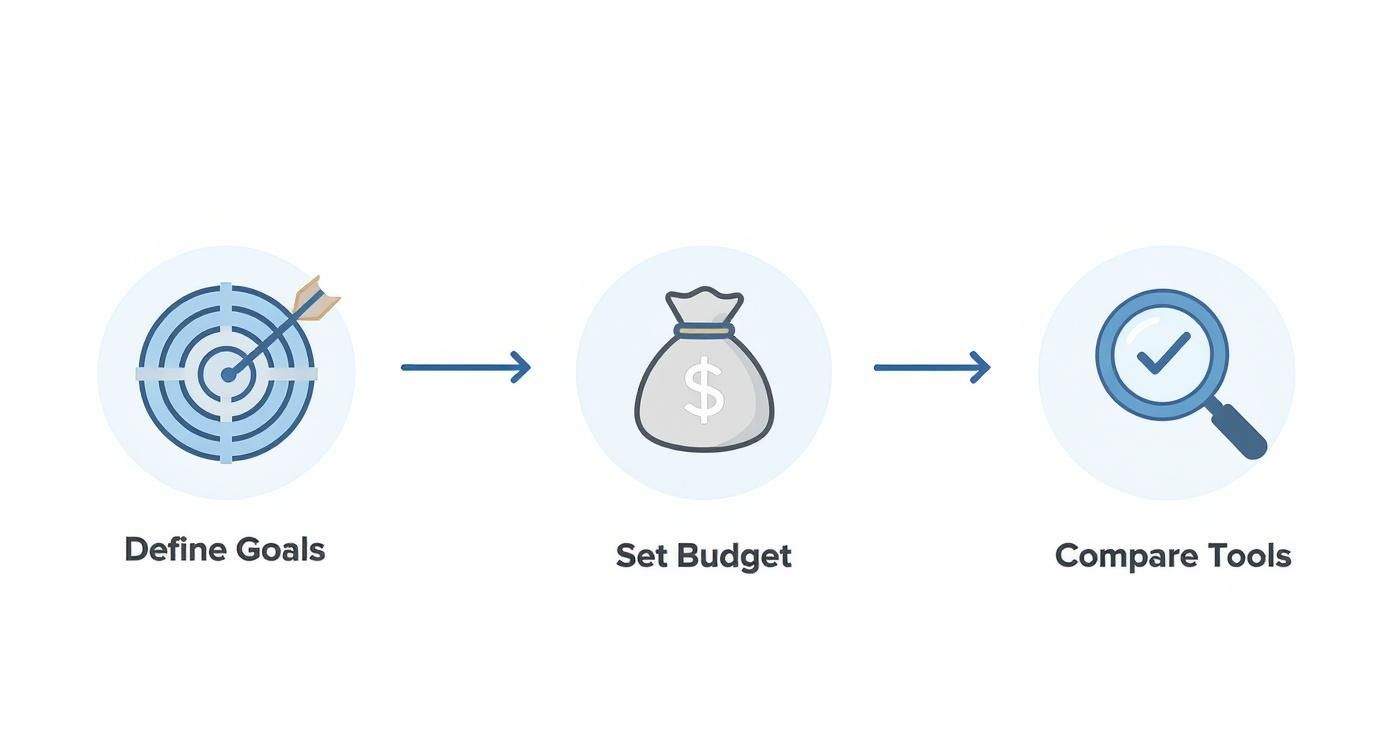
As you can see, a solid strategy starts with getting clear on your goals, figuring out your budget, and then finding the tool that fits just right.
Here’s the rewritten section, designed to sound completely human and natural:
Common Mistakes to Avoid When Using SEO Tools
Getting your hands on a good SEO tool is a great move, but the real magic happens in how you use it. Just having the tool won't get you far; you have to steer clear of the common pitfalls that trip up so many business owners. Think of this as your shortcut to a smarter SEO strategy, learned from the mistakes of others.
The biggest trap? Thinking of your SEO software as a crockpot you can just "set and forget." SEO is an active, ongoing effort, not a one-and-done task. Your tool is constantly feeding you fresh insights about your site's health, what your competitors are up to, and where the market is headed. If you only check in every few months, you're leaving a ton of opportunities on the table.
Make it a habit. Block off a little time each week to peek at your dashboard, see how your rankings are doing, and tackle any new issues your site audit has flagged. Small, consistent actions are what build serious momentum over time.
Chasing Only the Toughest Keywords
I see this all the time. A new user gets excited and immediately tries to rank for the biggest, broadest keywords in their niche—think "wedding photography" or "coffee beans." While those terms get a ton of traffic, they're also insanely competitive. It's like a brand new band trying to headline a stadium tour right out of the gate. It's just not going to happen.
A much smarter play is to use your SEO software for small business to dig up long-tail keywords. These are the longer, more specific phrases people actually type into Google, like "outdoor wedding photographer in Boise" or "organic single-origin Ethiopian coffee beans."
Sure, fewer people search for these terms, but the ones who do are often much closer to buying. That specificity signals strong intent, making that traffic incredibly valuable. Nail these easier wins first, build up your site's authority, and then you can start taking a swing at the bigger, more competitive keywords.
Ignoring the Technical Details
It's easy to get laser-focused on creating great content and finding keywords, but many business owners completely glaze over the technical side of SEO. When your software’s site audit starts flagging things like broken links, slow page speed, or missing meta descriptions, the temptation is to just ignore them as "tech stuff."
Don't make this mistake. Technical problems are like having a gorgeous shop with a door that's stuck. It doesn't matter how amazing your products are if customers can't get inside.
Search engines like Google want to send users to websites that are fast, secure, and easy to use. Ignoring those technical alerts is like putting up roadblocks that stop both customers and search engine crawlers in their tracks. Take the time to fix what the tool finds—you'd be surprised how many are simple fixes that can give your rankings a real boost.
Got Questions About SEO Software? We've Got Answers.
It's completely normal to have a few questions when you're thinking about jumping into SEO software. In fact, it's a good sign—it means you're taking your business growth seriously. Let's tackle some of the most common ones I hear from small business owners just like you.
Think of this as a quick, no-nonsense Q&A to clear up any confusion and help you feel confident about your next move.
How Long Until I Actually See Results?
This is the big one, isn't it? The straight-up answer is: SEO is a long game. While you can get immediate insights from a site audit and start ticking off to-do items right away, you'll typically need 3 to 6 months of consistent effort before you see a real impact on your rankings and traffic.
Think of it like getting in shape. The software is your personal trainer and gym membership—it gives you the plan and the tools. But you still have to show up, do the work, and be patient. The results don't happen overnight, but with steady work guided by the software, your online presence will get stronger and stronger over time.
SEO is an investment in your business’s future. The momentum you build creates a solid foundation that keeps paying off, unlike paid ads that vanish the second you stop paying the bill.
Do I Need to Be an SEO Whiz to Use This Stuff?
Nope, not at all. The best SEO software for small business is built for business owners, not technical gurus. These tools are designed to be user-friendly, with clean dashboards, simple charts, and plain-English tips that translate complex data into actionable advice.
They're made to close the knowledge gap. A basic understanding of SEO (like what you’ve picked up here) is a great head start, but you definitely don’t need to be a coding expert to log in and start improving your site.
Is Free SEO Software Good Enough to Get By?
Free tools like Google Search Console are fantastic—and honestly, you absolutely should be using them. They give you a baseline for how your site is doing in Google's eyes. But they have their limitations. They'll show you what's happening, but they won't tell you why a competitor is outranking you.
That’s where paid software gives you a serious leg up. It unlocks a different level of strategy:
- See What Your Competitors Are Up To: Pinpoint the exact keywords your rivals are ranking for and see who is linking to them.
- Find Hidden Gem Keywords: Discover low-competition keyword opportunities that free tools almost always overlook.
- Put Tasks on Autopilot: Automate things like tracking your rankings and monitoring your site’s health, saving you a ton of time.
Most quality tools offer a free trial, which is the perfect way to see the difference for yourself. You can get a feel for the platform and decide if the investment is right for your business.
Ready to stop guessing and start growing? At Wand Websites, we build high-performing e-commerce sites designed to turn your hard work into more traffic and sales. Let us handle the technical details so you can focus on your business. Learn more about our website design services.
