
How to Improve Ecommerce Customer Experience: Complete Guide

Understanding What Your Customers Actually Experience
Before you can fix a single thing about your ecommerce customer experience, you have to get out of your own head. As a business owner, you know your site inside and out—every category, every button, every quirk. But a first-time visitor? They see a completely different reality, one that might be full of little annoyances that make them give up and leave. The goal is to see your store through their eyes and spot the small frustrations you've become blind to.
This gap between your perception and their reality is where sales go to die. We often design for a perfect, linear path, but customers rarely stick to the script. That gorgeous, artistic banner on your homepage might look amazing to you, but if it shoves your product categories below the fold on a smartphone, a huge chunk of your visitors will never even see them. Mobile shoppers, especially, are on a mission and won't tolerate slow pages or confusing menus.
Charting the Real Customer Journey
To get a true picture of what shoppers go through, you need to create a customer journey map. This isn't just a simple flowchart of your sales funnel. It's a detailed visual of every single touchpoint a customer has with your brand, from the moment they first hear about you to the follow-up email you send after their purchase. A good map includes what they're thinking, feeling, and struggling with at each step.
Here’s a snapshot of what a customer journey map can look like, breaking down the experience into stages like awareness, consideration, and purchase.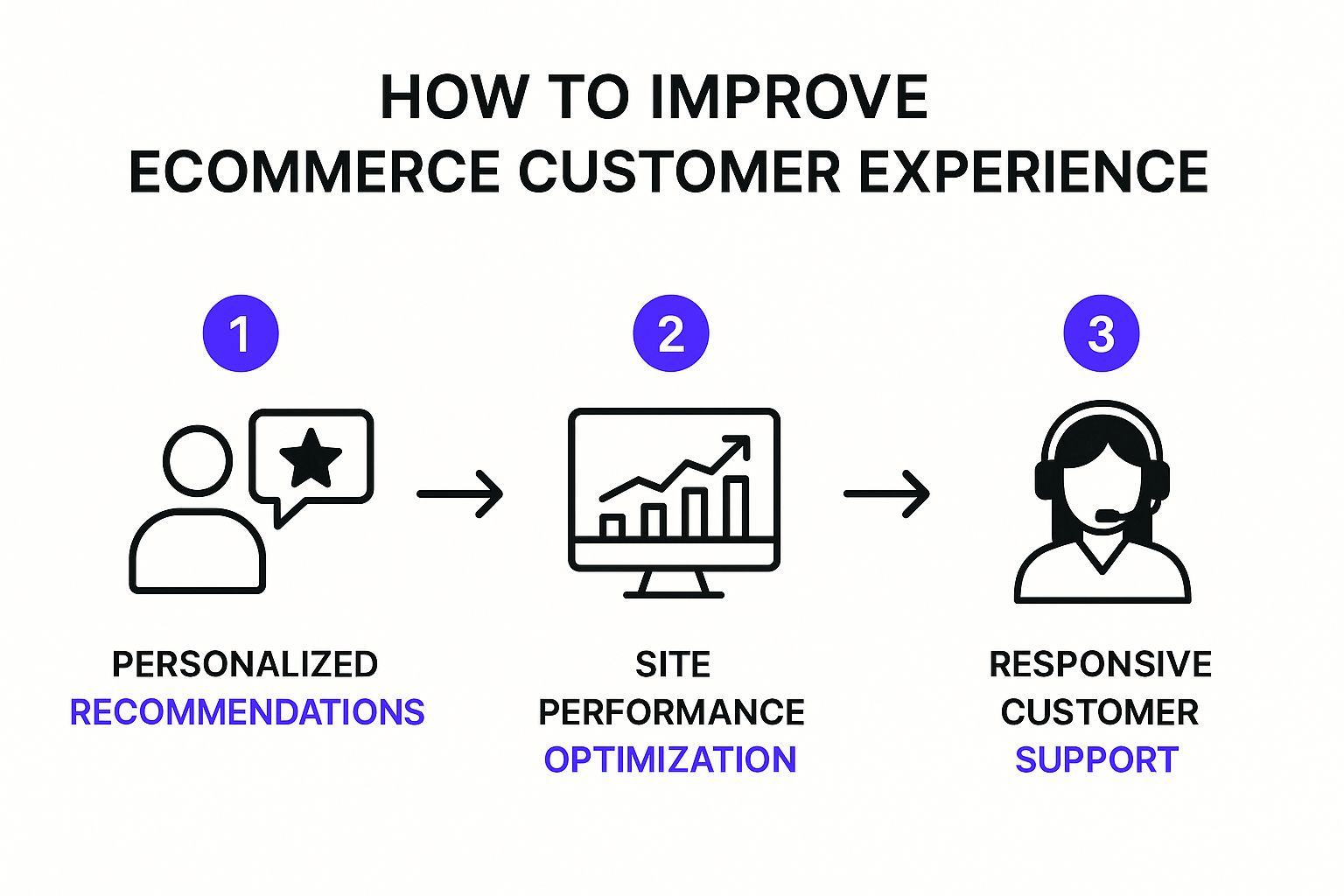 Mapping this journey helps you pinpoint those critical moments where a shopper gets stuck or confused, showing you exactly where to focus your efforts.
Uncovering Hidden Friction with Data and Feedback
While a journey map gives you the big picture, the real magic happens when you fill it in with hard data and direct feedback. Start by digging into your analytics. Where are people dropping off? Is there a mass exodus from a specific product page or during the shipping selection step? This data tells you what is happening.
To understand why it's happening, you need to ask your customers. Simple post-purchase surveys, user testing sessions (even informal ones with friends), or just reading through your customer service tickets can offer priceless insights.
Broader industry stats also provide useful context. With over 28 million ecommerce stores out there, the competition is fierce. A solid 34% of consumers shop online every week, meaning they’re constantly comparing your store to others and have sky-high expectations. And here's a big one: an incredible 99% of customers rely on reviews before buying, which proves they trust other shoppers far more than brand messaging. If you want to dive deeper into these trends, you can explore more shopper statistics and their implications on Seller’s Commerce.
To help visualize how to approach this, the table below breaks down key touchpoints in the customer journey and their typical impact.
Customer Journey Touchpoint Analysis
Comparison of critical touchpoints across different stages of the ecommerce customer journey and their impact on conversion rates
This table shows that friction at any stage can derail a sale. A great ad is useless if the product page is confusing, and an easy checkout means nothing if post-purchase support is a nightmare.
This infographic simplifies the improvement process into three core pillars: personalization, performance, and support.
The key takeaway is that a great customer experience isn't about one single thing. It’s about how all these elements work together. By combining a high-level strategy with your detailed journey map and real customer data, you can build a clear, actionable plan to truly improve your ecommerce customer experience.
Making Every Visitor Feel Like Your Store Knows Them
Generic, one-size-fits-all shopping is a thing of the past. These days, customers don’t just want personalization; they expect it. Creating this tailored feeling doesn't require a massive tech budget. It’s about being smart and observant, using the clues visitors leave behind to guide them toward products they’ll genuinely love. Think of it as being a helpful store clerk who remembers a customer's style, rather than a pushy salesperson. This is a core part of figuring out how to improve ecommerce customer experience because it shifts the interaction from transactional to relational.
The big idea here is to move beyond simply selling products and start creating individual shopping journeys. When you get this right, it feels less like marketing and more like helpful guidance, which builds trust and encourages loyalty.
Using Behavior to Power Smart Recommendations
Your customers are constantly telling you what they want through their clicks. Every product they view, every category they browse, and every item they add to their cart is a signal. Your job is to listen. Instead of showing everyone the same "Bestsellers" list on your homepage, use this data to create dynamic product recommendations.
For instance, if a visitor spends a few minutes looking at minimalist black-and-white art prints, your site should start showing them more abstract monochrome art—not your brightly colored floral bestsellers. This simple adjustment shows you're paying attention.
Just look at how a master of personalization like Amazon handles this on its homepage.

This screenshot perfectly shows how browsing history ("Inspired by your browsing history") and past purchases directly inform what you see next. It’s like having a unique storefront built just for you.
This isn’t just about showing more of the same, either. Good personalization also involves smart cross-selling. If someone buys a high-end coffee grinder, it makes sense to recommend premium single-origin beans or a quality water kettle—not another grinder. These are logical next steps that add real value to their original purchase.
Creating Segments That Actually Drive Action
True personalization goes deeper than just the product suggestions on your site. It also shapes how you communicate with your audience, especially through email. Sending the same promotional email to your entire list is a quick way to see your unsubscribe rate climb. A much better approach is to use customer data to create meaningful segments.
Here are a few practical segments you can build today:
- First-Time Buyers: Welcome them with a special offer on their next purchase to encourage a second visit. Your goal here is to build the relationship, not overwhelm them.
- High-Value Customers: These are your VIPs. Give them early access to new products, exclusive discounts, or a sneak peek at an upcoming sale. Make them feel special, because they are.
- Cart Abandoners: Send a gentle reminder. Sometimes, a simple "Did you forget something?" email is all it takes. You can even include a small discount to nudge them over the finish line.
- Category-Specific Shoppers: If someone has only ever bought dog toys from your pet store, don't send them promotions for cat litter. Keep your messaging tailored to their known interests.
The data overwhelmingly backs this up. Businesses that nail personalization see about 40% higher revenue than competitors who don’t. This happens because 80% of consumers are more likely to buy from a brand that offers tailored interactions. It's a powerful strategy, with case studies showing that even small efforts can significantly lift conversion rates. The focus on individual needs is so important that nearly 75% of shoppers say they value personalized loyalty programs that keep them coming back. If you want to dive into the numbers, you can find out more about the impact of great customer experience on Invespcro.
Ultimately, making visitors feel known comes down to respect—respecting their time, their preferences, and their intelligence. When you use data to be more relevant and helpful, you create a real connection that can turn a one-time browser into a long-term, loyal customer.
Building a Store That Works Effortlessly
 A gorgeous website that's confusing to navigate is like a beautiful storefront with a jammed door. If shoppers have to struggle to find what they're looking for, they'll just leave. A key part of a great e-commerce customer experience is making sure your store feels natural and simple from the first click. This involves clear navigation, a search bar that understands what people want, and product pages that answer questions before they're even asked.
Think about it this way: every bit of brainpower a customer uses to figure out your site is energy they aren't using to get excited about your products. A smooth, easy path guides visitors toward making a purchase, while a clunky interface puts up roadblocks that hurt conversions. When a visitor can find what they need without a second thought, you've created a store that truly serves them.
Prioritizing Speed and Mobile Usability
Before you start thinking about big design overhauls, let's talk about the absolute foundation: speed. In e-commerce, every single second is critical. Research shows most visitors will abandon a mobile site if it takes longer than 3 seconds to load. That’s a very small window to make a good first impression. Slow load times are a massive source of frustration and a top reason for high bounce rates.
Making your site faster often provides a much better return on your investment than a total redesign because it solves a universal problem for all customers. You can use free tools like Google's PageSpeed Insights to get a performance audit. It gives you a clear score and a list of specific recommendations, showing you exactly what’s slowing you down, whether it's oversized images or clunky code.
Beyond just speed, a mobile-first approach is essential, especially since over 65% of all e-commerce traffic now comes from smartphones. This isn’t just about shrinking your desktop site; it's about redesigning the experience for a smaller, touch-based screen.
- Simple Navigation: Use a clean mobile menu (like the classic "hamburger" icon) and make sure all buttons are big enough for easy tapping.
- Optimized Images: Compress your images so they load quickly without looking pixelated.
- Shorter Forms: Keep forms as brief as possible, especially during checkout, to reduce how much a customer has to type on their phone.
To help you prioritize your optimization efforts, here’s a quick checklist that ranks different tasks by their impact on the customer experience.
This table shows that some of the most impactful changes, like compressing images, are actually quite simple to implement. Focusing on these high-impact, low-difficulty tasks first can give you quick wins and immediately improve your customer experience.
Designing Product Pages That Convert
Your product page is the final sales pitch. It’s where customers make the ultimate decision to buy or not. These pages need to be more than just a gallery of photos; they should be a complete resource that builds trust and removes any lingering hesitation. A truly effective product page anticipates and answers every potential question.
Start with top-notch visuals. You need a mix of professional product shots from every angle, lifestyle photos showing the product in action, and even short video demonstrations. Next, focus on writing clear and persuasive product descriptions. Don't just list the features—explain the benefits. How does this product make the customer's life easier or better?
Finally, structure the information logically. Use bullet points for key features, have a separate section for technical specs, and feature customer reviews and FAQs prominently. The main goal is to give shoppers all the information they need in a format that's easy to scan, empowering them to click "Add to Cart" with confidence.
Turning Customer Problems Into Relationship Wins
Let’s face it, things go wrong in e-commerce. It doesn't matter how dialed-in your process is; a package will eventually get delayed, a product might not live up to someone's expectations, or a customer just might be having a bad day. These moments of friction aren't just problems to be solved—they're genuine opportunities. How you handle these situations can define your relationship with a customer, turning a frustrated buyer into a lifelong fan.
The secret is to stop thinking of customer service as a cost center and start seeing it as your most powerful retention tool. A problem that's handled well can build more loyalty than a perfectly smooth transaction ever could. It shows you’re a real business with real people who stand behind what you sell.
Choosing the Right Channel for the Right Problem
Not all customer issues are the same, so why would you force them all through the same channel? Pushing a customer with a complex, urgent issue into a clunky chatbot is a surefire way to make a bad situation worse. A better approach is to guide people to the communication method that best fits their problem.
- Live Chat & Phone Support: These are your go-to channels for time-sensitive, complicated problems. Think "I put the wrong address on an order that just shipped!" or "My payment method was declined." The immediate, real-time conversation is perfect for fast-paced problem-solving.
- Email & Help Desk Tickets: This is the ideal lane for less urgent matters that might need some digging, like a return request or a question about how to care for a product. It gives your team the space to gather all the details and provide a complete, well-thought-out answer.
- Self-Service FAQs & Help Centers: Perfect for common, straightforward questions like "What's your return policy?" or "How long does shipping usually take?" A solid help center empowers customers to get instant answers on their own, which saves everyone time.
Modern help desk software can bring all these interactions into one place, giving your support team a complete picture of every customer conversation.
This kind of unified view helps your team manage conversations across email, chat, and social media without losing crucial context, creating a much smoother support experience for the customer.
The numbers back this up. A jaw-dropping 89% of shoppers have switched to a competitor after just one poor customer service experience. When you consider that getting a new customer can cost up to seven times more than keeping an existing one, the business case is crystal clear. In fact, 72% of customers expect immediate service when they have an issue, and a huge 64% are willing to spend more with a company that resolves their problem quickly. You can discover more about how customer experience impacts business on Zendesk's blog.
Proactive Communication and Customer Recovery
The best customer service doesn't just wait for problems to happen—it gets ahead of them. If you know a massive snowstorm is about to delay shipments in the Midwest, send a proactive email to your customers in that area before they start asking where their package is. This simple act of transparency can turn a potential negative into a positive by showing you're on top of things.
When a problem does slip through, a solid customer recovery strategy is key. This is about more than just fixing the issue. Let's say a customer receives a damaged item. Your process should look something like this:
- Apologize Sincerely: First, acknowledge their frustration and show genuine empathy. A simple "I'm so sorry this happened" goes a long way.
- Resolve Immediately: Ship a replacement right away. Don't make them jump through a bunch of hoops to get what they paid for.
- Go the Extra Mile: This is the magic step. Include a small discount code for their next purchase or a handwritten "thank you" note in the replacement package.
That final, unexpected gesture is what transforms a problem into a relationship win. It demonstrates that you truly value their business and leaves them with a positive memory, not a frustrating one.
Eliminating Checkout Friction That Kills Sales
Cart abandonment is the silent killer of e-commerce revenue. It's that moment when a customer who wants your product, adds it to their cart, and is ready to buy suddenly hits a wall and disappears. This isn't just a lost sale; it's a breakdown in the customer experience at the most critical stage. Getting to the root of this hesitation is how you fix a leaky checkout funnel.
More often than not, the real culprit isn't a change of heart, but unexpected friction. Shoppers who make it to the checkout are highly motivated, but their patience is razor-thin. If the process feels confusing, slow, or untrustworthy, they'll leave without a second thought. This is especially true on mobile, where every extra field to fill out feels ten times more frustrating. The goal isn't just to have a checkout that works; it's to make it feel effortless and secure.
Designing a Checkout That Guides, Not Grinds
Think of your checkout page as the final, most important conversation you have with a customer. It needs to be clear, reassuring, and to the point. The single biggest reason for abandonment, showing up in nearly half of all cases, is surprise costs, especially for shipping. Hiding fees until the last second is a huge breach of trust.
A successful checkout process is transparent from the very start.
- Guest Checkout is Non-Negotiable: Forcing customers to create an account before they can buy is a notorious conversion killer. Always offer a prominent guest checkout option. You can gently prompt them to create an account after the purchase is complete.
- Keep Forms Simple and Smart: Only ask for information you absolutely need. Use helpful tools like address autofill to cut down on typing. The focus here should be on clarity, not just the number of fields. A longer form that's easy to understand is better than a short one that's confusing.
- Show Progress Clearly: A simple visual progress bar (e.g., Shipping > Payment > Confirm) lets customers know exactly where they are in the process. This manages their expectations and prevents that feeling of being stuck in an endless loop.
For instance, a clean, single-page checkout design often performs well by laying out all the necessary info in one organized view.
This layout reduces clicks and keeps the customer focused on finishing their purchase without bouncing between pages.
Building Trust with Payment and Security
When a customer pulls out their credit card, they need to feel completely safe. This is where trust signals become incredibly important.
Ultimately, a frictionless checkout is fundamental to a great e-commerce customer experience. It shows you respect the customer's time, builds their confidence, and ensures all your hard work getting them to that point actually pays off. By removing obstacles and building trust, you turn hesitant shoppers into happy, paying customers.
Using Customer Voices to Guide Your Improvements
Your customers are leaving you a trail of breadcrumbs every single day, showing you exactly how to make their shopping experience better. The real question is: are you listening? It's easy to get fixated on generic satisfaction scores and miss the rich, actionable details hiding in customer comments. To truly improve your e-commerce customer experience, you have to move beyond a simple star rating. Instead of just asking if they were happy, you need to dig into why they felt that way.
The trick is to ask open-ended questions at the right moment. A post-purchase email is a classic, but timing is everything. If you send it too soon, they haven't had a chance to really use the product. If you wait too long, the initial excitement has worn off. I've found that the sweet spot is often 7-14 days after delivery. This gives them enough time to form a real opinion without forgetting the details of their purchase journey.
Asking Questions That Reveal Actionable Insights
Generic questions will only get you generic answers. If you want feedback you can actually use, you have to get specific. Forget "How was your experience?" and try framing questions that get to the heart of their journey.
- "What was the one thing that almost stopped you from completing your purchase?" This is a fantastic way to uncover friction in your checkout process or areas where customers might not fully trust your site.
- "Was there anything you were looking for on our site that you couldn't find?" This helps you spot gaps in your product catalog or identify confusing site navigation.
- "How did our product compare to what you expected from the photos and description?" This tells you if your product pages are setting the right expectations or if you need to adjust your imagery or copy.
This isn't just about collecting data; it's about creating a continuous loop where feedback directly informs your next move.
As the model shows, feedback isn't a one-time event. It's a cycle that should fuel every decision you make about your store, turning customer insights into tangible improvements.
Turning Feedback into Smart Business Decisions
Once you start gathering this kind of qualitative feedback, the next step is to look for patterns. One customer complaining about slow shipping might be a one-off issue. But if you see ten similar comments pop up in a week, you've likely pinpointed a real problem with your fulfillment partner that needs your immediate attention.
This is also how you can handle negative reviews constructively. Instead of getting defensive, see it as a free consultation. For instance, if a customer leaves a two-star review saying, "The color looked totally different in person," don't just offer an apology. Take action. Update your product photos with better, more accurate lighting, or add a note to the description about potential color variations.
This approach transforms feedback from a customer service task into a powerful driver for your business strategy. One of the biggest challenges for growing stores, like the ones we help build at Wand Websites, is figuring out what to fix first. Customer voices give you a clear roadmap. Fix the problems that real customers are telling you about, not the ones you think are important. This focus ensures your efforts will have the biggest possible impact on both satisfaction and sales.
Measuring Progress and Planning Your Next Moves
Improving your customer experience isn't a "set it and forget it" kind of task. It’s a continuous loop of listening to what your shoppers do, tweaking your site, and seeing what happens. The tricky part is figuring out what to measure. It's all too easy to get caught up in "vanity metrics" that look great on a report but don't actually tell you if people are having a better time shopping with you.
For instance, instead of just watching your overall conversion rate, get more specific. What's the conversion rate for first-time visitors compared to your loyal returning customers? If that second number starts climbing, you know your improvements are building loyalty. Likewise, a low bounce rate is nice, but if you see a high "add to cart" rate paired with a ton of abandoned carts, you've pinpointed a problem in your checkout flow, not your product pages. This kind of detailed insight turns your data from a confusing mess into a clear roadmap of what to fix next.
Key Metrics That Actually Matter
To get a real sense of whether your efforts to improve the ecommerce customer experience are working, you need to look at a balanced set of numbers. Don't just obsess over sales; pay attention to the customer behaviors that lead to those sales. Here are a few essential metrics to start with.
- Customer Lifetime Value (CLV): This is the holy grail of experience metrics. When your CLV goes up, it means customers are coming back for more and spending more each time they do. It’s a direct sign of a great, sticky experience.
- Net Promoter Score (NPS): Simply asking, "How likely are you to recommend us to a friend?" gives you a powerful snapshot of customer satisfaction and brand loyalty. It's a single number that speaks volumes.
- Task Success Rate: Can people actually do what they came to do? Use session recording tools or simple feedback surveys to see if shoppers can complete key actions, like finding your return policy or successfully applying a discount code.
A Framework for Continuous Improvement
Once you're tracking the right things, you need a system to turn those insights into action. The key is not to try and fix everything at once. I'm a big fan of using a simple impact-versus-effort matrix to prioritize what's next. It helps you spot the quick wins that create momentum.
This structured way of thinking changes measurement from a chore into a strategic tool for your business. It makes sure every change you make is thoughtful, effective, and gets you closer to building an experience that customers truly appreciate.
Ready to stop guessing what works and start building a website that drives real growth? At Wand Websites, we specialize in turning Etsy shops and growing stores into high-converting e-commerce powerhouses. Let's build a website your customers will love.
