
How to Create Product Catalogs That Boost Sales

Before you even think about picking a template or agonising over fonts, let's talk about what really makes a product catalog work. A successful catalog isn't just a pretty booklet of your products; it’s a powerful sales machine. And like any machine, it needs a solid blueprint.
Think of it this way: you wouldn't build a house without a foundation, right? The same principle applies here. Skipping the strategic groundwork is the number one reason catalogs fail to connect with customers and, ultimately, fail to drive sales.
This upfront work really boils down to two simple but crucial questions: Who am I talking to, and what do I want them to do? Your answers to these will shape every single decision you make from here on out.
Figure Out Your Audience and Goals
First things first, get crystal clear on who you're creating this for. Are you trying to win over wholesale partners, or are you speaking directly to the people who will use your products every day? These are two completely different conversations.
- B2B Audiences (Wholesale): These folks care about the bottom line. They need the hard data: SKUs, technical specs, wholesale pricing tiers, and case-pack info. They're looking for efficiency and profitability.
- Retail Customers (B2C): This group is all about the experience. They want to see your products in action through beautiful lifestyle photos. They connect with stories, customer reviews, and anything that helps them imagine your product in their own lives.
For instance, a coffee roaster’s B2B catalog for cafes would be packed with details on origin, flavor profiles, bulk bag pricing, and brewing parameters. Their B2C catalog for at-home coffee lovers? That would feature stunning photos of cozy morning rituals, tasting notes described in rich, evocative language, and maybe a guide to the perfect pour-over.
When you try to make a catalog for everyone, it ends up speaking to no one.
Key Takeaway: A catalog tailored to a specific audience is the secret to making it a profitable sales tool. Everything from the data you include to the photos you choose should be a direct answer to what that audience needs and wants.
Get Your Product Data in Order
Once you know who you’re talking to, it’s time to wrangle all your product information. I won't lie, this is often the most tedious part of the whole process, but getting it right now will save you a world of headaches and expensive reprints later.
The best way to start is with a master spreadsheet. Think of it as your single source of truth. This isn't just about making a list; it's about creating a structured, standardized database for every single detail. We're talking about everything from product names and SKUs to descriptions and image file names.
Properly organized data is what separates a professional, effective catalog from an amateurish one. When you get to the design phase, you'll be able to pull exactly what you need, knowing it's accurate and consistent. This turns your data from a messy pile of info into a strategic asset.
Before you jump into designing, use this checklist to make sure you have all your ducks in a row. It’s a simple reference to ensure nothing gets missed.
Essential Product Data Checklist
Having this table filled out completely before you start designing will feel like a superpower. It ensures a smooth, efficient workflow and a much more polished final product.
How to Organize Your Product Data and Descriptions
Alright, you've got your strategy mapped out. Now for the fun part: wrangling all that product information. This isn't just about data entry; it’s about shaping your product data into something a real customer can easily navigate. You're essentially building a clear path for them, leading them straight to what they need without any frustrating detours.
The first thing to do is think in terms of hierarchy. You want to guide shoppers from the big picture down to the nitty-gritty details. For instance, if you sell home goods, your structure might look something like this: Home Decor > Lighting > Table Lamps > "The Edison" Lamp. This kind of logical flow makes it a breeze for someone to find a specific item and, just as importantly, helps them stumble upon other cool things they might like.
Get Your Data in One Place
Trust me on this one: the best way to keep your sanity is to create a centralized spreadsheet using something like Google Sheets or Excel. This file becomes your single source of truth for every product. It’s the key to avoiding those little inconsistencies that can make you look unprofessional and erode a customer's trust. Getting this right from the start will save you so many headaches later on.
Here’s a simple look at what this might look like.
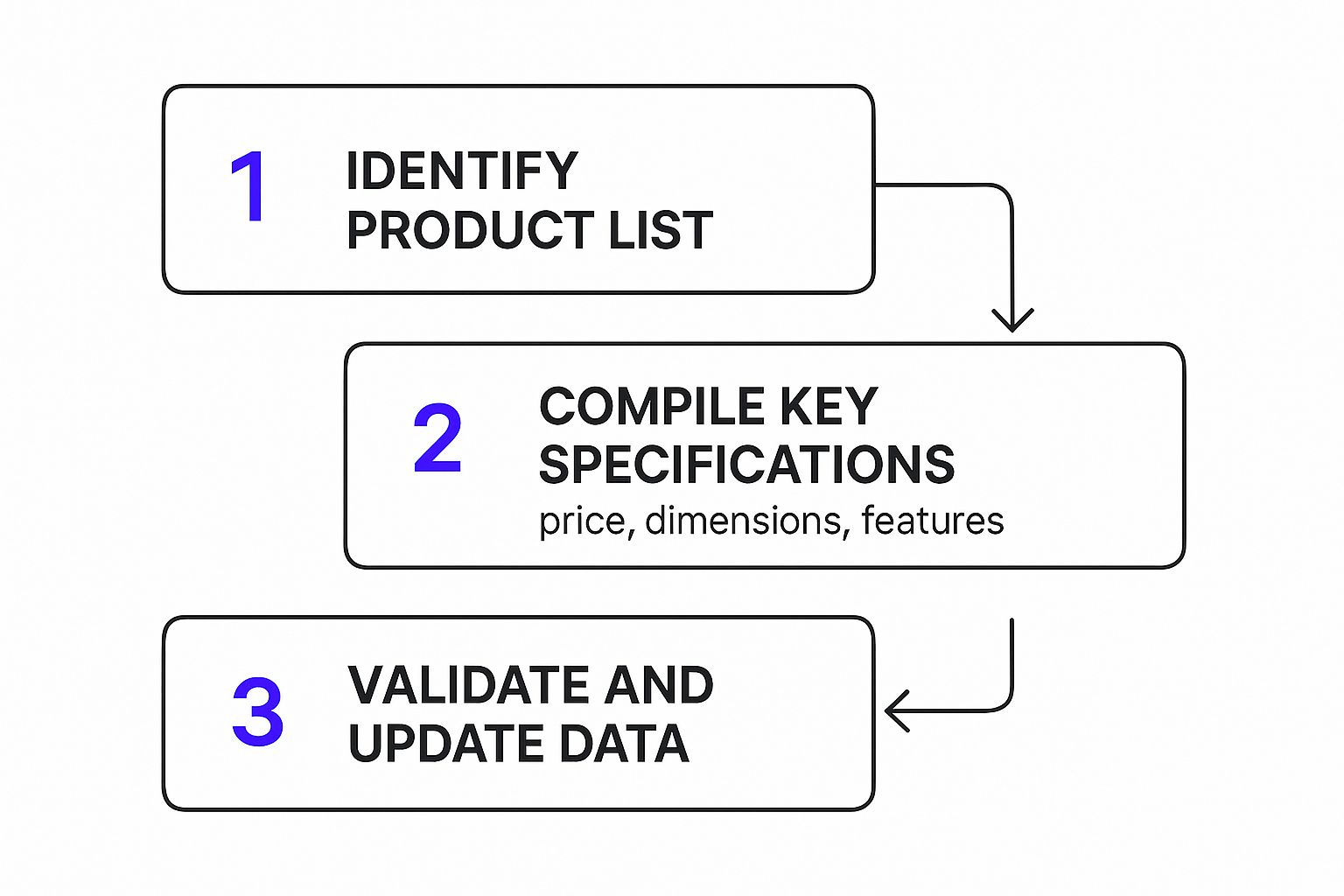
By using a central hub like this, you can make sure your SKUs, product names, and specs all follow the same format. Consistency is everything.
This idea of organizing business data isn't just a small-time tactic; it's a massive industry. The global data catalog market recently shot up from $718.1 million to an estimated $1.05 billion. Why? Because businesses everywhere are realizing just how crucial it is to have accessible, well-managed information.
Write Descriptions That Actually Sell
With your data neatly organized, it’s time to breathe some life into it. A great product description does more than just list features—it tells a story, solves a problem, or paints a picture that connects with your ideal customer.
- Talk Benefits, Not Just Specs: Instead of saying a backpack has "water-resistant nylon," try something like, "Keeps your laptop and books bone-dry, even on the rainiest commutes." See the difference?
- Let Your Brand Voice Shine: Are you fun and quirky or more buttoned-up and technical? Your product copy is the perfect place to show off your brand's personality.
- Make It Easy to Scan: Nobody wants to read a wall of text. Use short paragraphs, bullet points, and bold text to break things up. This helps customers spot the key details they're looking for in seconds.
A compelling product description is what turns a casual browser into a buyer. It helps the customer imagine using the product in their own life, transforming a "maybe" into a definite "yes."
Once your data is pulled together, you’ll want to get it ready for all the places it needs to live online. For many, that means getting it into shape for Google. A good next step is mastering your Google Shopping product feed to make sure you show up and stand out. When you build your catalog on a foundation of clean, organized, and persuasive info, you're setting yourself up for success.
Designing a Visually Compelling Catalog Experience
Alright, this is where all that strategic planning and data organizing you did starts to pay off. A great design doesn’t just look good—it elevates your products from mere items on a page to must-have essentials. It's about translating your brand's unique vibe, whether that's sleek and modern or warm and rustic, into a visual experience.
Think of your catalog's design as its personality. Is it bold and professional? Friendly and approachable? Every font choice, color palette, and image layout works together to tell your brand's story. Your goal isn't just to display products; it's to pull customers into a visual journey they won't want to leave.
To really nail this, it helps to have a solid grasp of the design process in graphic design. This gives you a proven framework for turning your brand's abstract ideas into a beautiful, functional layout that truly connects with people.
High-Quality Photography Is Non-Negotiable
Let’s get straight to the point: your product photos are the most critical part of your catalog. Period. They’re what stop the scroll, create desire, and ultimately convince someone to buy. Research consistently shows that a staggering 93% of consumers say visual appearance is the key factor in their purchasing decisions. Investing in top-notch photography isn't an extravagance; it’s a core business requirement.
To really paint a complete picture for your customers, you’ll want a smart mix of photo styles:
- Studio Shots: These are your bread and butter—crisp, clean images on a simple background. They show every detail, angle, and texture with perfect clarity. This is all about building trust and letting shoppers inspect the product as if it were right in front of them.
- Lifestyle Photos: This is where the magic happens. These shots place your product in a real-world setting, helping customers imagine it in their own lives. A lifestyle photo can show how that sofa looks in a cozy living room or how that jacket fits on a real person, forging an emotional connection that studio shots alone can't.
Think about a furniture brand. You need that clean studio shot of a sofa to show off the craftsmanship, but you also need to show it in a beautifully styled room to spark a buyer's imagination.
Creating a Layout That Flows
Once you have your incredible photos, it’s time to arrange them with your product descriptions and a bit of breathing room. A well-designed layout guides your customer's eye smoothly across the page, making the whole experience feel intuitive and enjoyable.
The biggest rookie mistake I see is trying to cram too much onto a single page. Don't be afraid of white space! Those empty areas around your images and text are your best friends. They cut down on visual clutter, make your text easier to read, and give your products a more premium, high-end feel.
Pro Tip: Consistency is key. Use a grid system to keep your photos and text blocks aligned from one page to the next. This simple technique gives your catalog a polished, professional look and makes browsing feel effortless for your customers.
At the end of the day, designing a great catalog is about so much more than just looking pretty. It's about creating an experience that embodies your brand's quality, builds unwavering customer confidence, and makes it incredibly easy for people to fall in love with—and buy—what you're selling.
Bringing Your Catalog to Life on E-commerce Platforms

Alright, your data is finally clean and your design looks sharp. Now comes the exciting part: connecting all that hard work to a live storefront. This is where your catalog stops being a spreadsheet and starts being a 24/7 sales tool.
Think of platforms like Shopify as the engine for your online store. They’re built to turn your product information into a real, functional shop where people can browse, click, and buy. Your mission here isn't just to dump your products online—it's to create an intuitive, seamless shopping experience.
The digital marketplace is crowded, which makes a smooth, professional setup absolutely critical. Global e-commerce sales are expected to blow past $6.86 trillion, and you're competing with over 28 million other online stores. Seeing how big a slice of that market platforms like Shopify hold really drives home how essential they are. If you’re curious, you can explore more e-commerce stats and see how your store fits into the global picture on textmaster.com.
Getting Your Product Data Uploaded
First things first, you need to get all that product information into your chosen platform. The good news? You don't have to type everything out one by one. The master spreadsheet you've been working on is about to become your best friend.
Most platforms, including Shopify, let you import everything with a single CSV file. This is a massive time-saver. A correctly formatted CSV can populate your store with every product name, SKU, price, and description in just a few clicks.
Pro-Tip: Before you hit "upload," take a minute to download the platform's specific CSV template. Shopify has one. Cross-reference it with your spreadsheet to make sure your column headers match exactly. A little bit of prep here will save you a huge headache later.
Building Smart Collections and Intuitive Navigation
Just listing all your products on one page is a recipe for overwhelming your customers. The key is to organize them into logical collections (or categories). This is what helps people find what they’re looking for—and discover things they didn't even know they wanted.
Don't just stick to the obvious categories like "T-Shirts" or "Accessories." Get creative and think like your customer. What are they trying to achieve?
You could create collections based on:
- A specific theme: "Summer Vacation Essentials" or "Cozy Fall Favorites"
- A particular use case: "Perfect Gifts for Dad" or "The Ultimate Home Office"
- A current promotion: "Our Top-Rated Best Sellers" or "Fresh for Spring"
These kinds of thoughtful groupings do more than just clean up your site. They actively guide customers, making it easy to upsell and cross-sell. When you make browsing easy and enjoyable, you make buying an almost effortless next step.
A great digital catalog doesn't just display products; it guides the customer. By using smart collections and clear navigation, you're not just organizing your store—you're curating a shopping journey that makes browsing enjoyable and buying easy.
This is how you turn a simple product list into a dynamic, searchable online catalog that works hard for your business from the moment a visitor lands on your site.
Distributing and Optimizing Your Final Catalog

Alright, your catalog is finished and looking sharp. High five! But here's the thing I've learned over the years: creating a beautiful catalog is only half the job. Now you have to get it into the right hands and make sure it’s actually pulling its weight.
This final stretch is all about smart distribution and constant tweaking.
For your digital catalog, an interactive PDF is an incredibly versatile tool. I always recommend embedding it right on a high-traffic spot on your website—think your homepage or a dedicated “Lookbook” page. This makes it instantly available to anyone who drops by.
Email is another powerhouse channel. Don't just attach it to a generic newsletter. Craft a dedicated campaign announcing the new catalog, giving your most loyal customers the first peek. Even better, weave it into your automated welcome emails for new subscribers. It’s a fantastic way to introduce them to your entire product line from the get-go.
Maximizing Your Reach and Impact
To really squeeze every bit of value out of your hard work, you need to think beyond your own website and email list. A multi-channel strategy is key.
- Social Media Buzz: Create some slick, eye-catching posts and stories that show off your best pages. I've seen brands get great traction with short videos that flip through the catalog or carousel posts that highlight a few key spreads. It builds curiosity.
- The Magic of QR Codes: If you have a physical store, attend trade shows, or even just ship products, QR codes are a game-changer. Stick them on business cards, packing slips, or event banners. When you're handing out catalogs at events, it’s also a perfect time to focus on mastering trade show lead capture techniques to make the most of those new connections.
- Partner and Affiliate Networks: Don't forget to send the catalog to your wholesale partners, affiliates, and any friendly brands you collaborate with. Giving them a polished sales tool makes it that much easier for them to sell your products for you.
And if you’ve decided to go with a print version? Your choice of printer is absolutely critical. Please, don’t cut corners here. The right paper weight and finish can be the difference between a catalog that screams "premium" and one that feels cheap and disposable. Always ask for samples before you commit to a big print run.
A hard-earned lesson: A catalog that nobody sees is a complete waste of time and money. Your distribution plan deserves just as much thought as your design process. You need to blend digital convenience with physical touchpoints to meet customers wherever they are.
Tracking Performance to Refine and Improve
Your job isn't over once the catalog is out there. The real magic happens when you start paying attention to how people are using it. This is where digital catalogs have a huge advantage, offering a goldmine of data you just can't get from print.
Most online catalog platforms come with built-in analytics. You’ll want to keep a close eye on a few key numbers:
- Page Views and Time on Page: Which products or sections are holding people's attention the longest? This is your clearest indicator of what’s resonating.
- Click-Through Rates (CTRs): Are people actually clicking your “Buy Now” buttons or other links? If a page gets tons of views but few clicks, your call-to-action might be weak or misplaced.
- Downloads and Shares: Seeing how many people save or share your catalog is a great sign that they find it genuinely valuable.
Use these insights to make smarter decisions for your next version. Maybe that one product you were sure would be a star is getting ignored, while a lesser-known item is a surprise hit. This feedback loop is what transforms a simple product catalog into one of your most powerful sales engines.
Your Product Catalog Questions, Answered
As you dive into creating your first (or next) product catalog, you're bound to run into a few questions. It happens to everyone. Let's walk through some of the most common ones I hear from business owners, with some straightforward advice to help you move forward.
What's the Best Software to Create a Product Catalog?
There’s no single "best" tool—the right software really boils down to what you need to accomplish and how comfortable you are with design software. Think of it less as finding one perfect program and more as picking the right tool for the job at hand.
Here’s how I see the top options breaking down:
- For Professional Print Design: If you're aiming for a high-end, professionally printed catalog, nothing beats Adobe InDesign. It's the industry gold standard for a reason. It gives you complete control over every tiny detail, from typography to layout, ensuring your files are perfect for the printer. This is what the pros use.
- For Quick & Easy Digital (or Simple Print): Don't have a design background? No problem. Canva is your best friend. It's incredibly user-friendly and packed with great-looking templates. You can whip up a beautiful digital lookbook or a simple print-ready file in no time, without the steep learning curve of professional software.
- For Integrated E-commerce: If your catalog's main home is your website, then your e-commerce platform is your most powerful tool. Platforms like Shopify or BigCommerce are designed to create and manage product collections that are always synced with your inventory and pricing. It’s your living, breathing catalog.
How Often Should I Update My Product Catalog?
This all comes down to the natural rhythm of your business. If you're in a fast-paced industry like fashion or consumer tech, new products and trends are constantly popping up. For you, a quarterly or semi-annual update is probably necessary to keep things fresh and show customers you're on top of your game.
But if you sell more stable products, like industrial equipment or classic furniture pieces, an annual update is usually more than enough. The real beauty of a digital catalog is that you can make quick changes anytime—a price tweak here, an out-of-stock notice there—which is a massive advantage over printed versions.
The golden rule is to never let your customers see outdated information. Nothing erodes trust faster than wrong prices or a catalog full of discontinued items. Just make sure your update schedule lines up with your product launches and marketing plans.
Should I Go With a Print Catalog or a Digital One?
Honestly, the most powerful approach these days is often a mix of both. You don't have to choose.
A digital catalog is non-negotiable. It's cost-effective, easy to share, great for getting found on Google, and can be updated in a flash. It's where your customers are, so you need to be there, too.
But don't write off print just yet. A beautifully crafted print catalog has a tangible quality that cuts through the digital clutter. It creates a memorable, premium experience. Think about a B2B sales meeting or a luxury brand—handing someone a high-quality catalog can make a much stronger impression than sending a link.
At Wand Websites, we're experts at turning product lists into powerful Shopify stores that work as your ultimate digital catalog. If you're looking to build an e-commerce site that truly performs and puts you in control, let's connect. Learn how we can help you grow.
