
Ecommerce Payment Solutions A Guide for Shopify Stores

You built something real on Etsy. Orders come in, reviews prove the demand is there, and your product line has traction. But once sales become consistent, Etsy starts to feel less like a launchpad and more like a ceiling. You can't fully control the brand experience, you don't own the customer relationship the way you want to, and every operational decision runs through a marketplace system you didn't choose.
That's why moving to Shopify feels bigger than a redesign. It's a shift from renting shelf space to running your own store. And one of the first decisions that suddenly lands on your desk is payments.
On Etsy, payments are mostly invisible. On Shopify, they become strategic. The setup you choose affects checkout speed, customer trust, fraud risk, reporting, cash flow, and how easily you can expand into subscriptions, wallets, or international sales. Good ecommerce payment solutions don't just help you accept money. They help you protect margin and remove friction at the exact point where a shopper decides whether to buy.
Your First Big Decision After Leaving Etsy
Most successful Etsy sellers reach the same moment. Sales are healthy, product photos are polished, customers love the items, but the business starts outgrowing the marketplace wrapper around it. You want a store that feels like your brand, not a listing page beside competitors and copycats.
That's when payment decisions stop being background admin work.

On Etsy, the system is all-in-one. Customers pay through Etsy's flow, Etsy manages the rails behind the scenes, and you mostly focus on listings and fulfillment. That convenience is useful when you're getting started. It becomes limiting when you're trying to build a repeatable brand with your own checkout, your own post-purchase experience, and your own rules.
The shift is about control
A Shopify store gives you choices Etsy never really gave you:
- Checkout experience: You decide how simple or layered the payment flow should be.
- Payment methods: You can add wallets, card options, and other methods based on what your customers use.
- Operational visibility: You can track payouts, disputes, fraud signals, and reconciliation in a more direct way.
- Growth flexibility: You can support subscriptions, bundles, cross-border selling, and more without waiting for a marketplace to support it.
Leaving Etsy changes your job. You're not just managing listings anymore. You're designing how money moves through your business.
That can feel intimidating at first, especially if “payment gateway” sounds like something only developers care about. In practice, this is a business decision. The right setup helps good customers check out fast and makes bad transactions easier to stop.
What matters most right now
If you're moving off Etsy, don't start by asking which payment tool has the longest feature list. Start with simpler questions:
- Will this make checkout easier for my customers?
- Will it support the payment methods my audience expects?
- Will it create extra admin work every week?
- Will it still fit once order volume grows?
Those questions lead to better choices than chasing the cheapest headline rate.
Understanding Your New Payment Toolkit
Once you leave Etsy, the payment stack becomes visible. That's a good thing. You don't need to become a payments engineer, but you do need a working mental model.
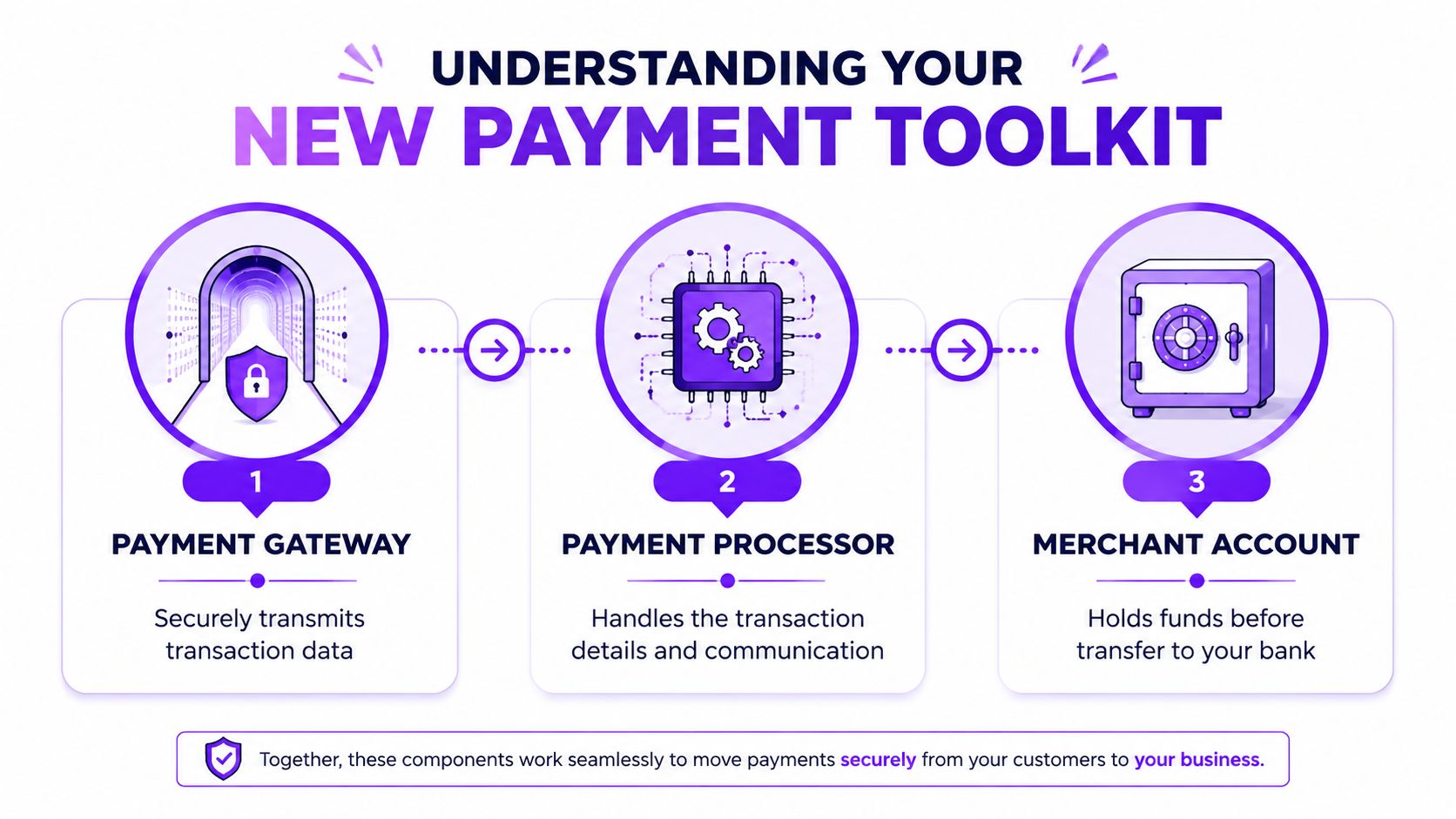
It's like a physical shop.
The gateway
The payment gateway is the card terminal at the counter. Online, it captures the customer's payment details, encrypts them, and sends them on for approval. BigCommerce's overview of ecommerce payments describes the gateway as the online equivalent of a POS terminal, and it notes that its ecosystem includes 65+ pre-integrated, PCI-compliant gateways with support for payments in 140+ currencies across 230 countries.
For a Shopify seller, that matters because the gateway sits right at the point of conversion. If checkout is clunky or unreliable, customers feel it immediately.
The processor
The payment processor is the network behind the scenes that moves the transaction through the banking system. It checks with the card network or wallet provider, confirms whether the charge is approved, and passes that response back to the store.
Customers never think about the processor. Merchants absolutely should. Approval reliability, payment method support, and how well failed payments are handled can all affect revenue.
If you want a clean walkthrough of how these moving parts fit together in a modern stack, Tagada payment orchestration strategies are a useful next read because they frame the difference between gateways, processors, and routing in practical terms.
The merchant account
The merchant account is where the money lands temporarily before it reaches your business bank account. In some setups, you won't see this as a separate product because providers bundle it into one service. Functionally, though, it still matters. It's the holding area that sits between customer payment and final payout.
Practical rule: Bundled tools are easier to launch. Separate components can offer more flexibility later. The right choice depends on how much complexity your current business can realistically manage.
Why this feels confusing at first
A lot of platforms blur these terms because they sell an all-in-one system. That's convenient, but it can hide important trade-offs. One provider may make setup easy but limit flexibility. Another may support more payment methods or markets but require more configuration.
For most Etsy sellers moving to Shopify, the key is understanding that these tools can be bundled while still doing different jobs.
Here's the simple version:
- Gateway: Collects and securely transmits payment data
- Processor: Communicates with financial networks to approve or decline the charge
- Merchant account: Holds funds before payout to your bank
Once you understand that flow, the rest of the payment conversation gets easier. You can look at Shopify Payments, PayPal, wallet support, fraud tools, and multi-currency options with much more confidence.
Key Features for a High-Growth Shopify Store
The payment setup that fits a new Shopify store is the one that helps you convert more buyers now without boxing you in six months from now. That matters even more if you built momentum on Etsy, where payments were mostly handled for you behind the scenes.

On Etsy, the payment experience is bundled into the marketplace. On Shopify, you choose the stack. That shift gives you more control over checkout, customer experience, and margin, but it also means you need to judge payment tools by how well they support growth, repeat purchases, and expansion into new channels or markets.
Payment methods customers already expect
Buyer habits have changed. Industry forecasts widely point in the same direction: digital wallets are taking a larger share of ecommerce payments, and customers increasingly expect fast checkout on mobile.
For a Shopify store, that has a direct impact on conversion. A shopper who trusts Apple Pay, Google Pay, PayPal, or another familiar option is less likely to stall at checkout, especially on a phone.
A strong setup should support:
- Cards and wallets together: Give buyers the payment methods they already use.
- Fast mobile checkout: Shorter checkout flows usually matter most on smaller screens.
- Local payment preferences: If you plan to sell internationally, payment expectations will vary by country.
Security that protects revenue
Security starts as a technical topic and quickly becomes a profit topic. Fraud, chargebacks, and false declines all affect revenue, customer trust, and support workload.
Mida's guide to ecommerce payment systems explains why tokenization, encryption, AVS, CVV checks, AI/ML fraud detection, and 3-D Secure 2.0 matter in practice. It notes that tokenization replaces card details with a non-sensitive token, which is especially useful for recurring billing, and that adaptive authentication adopted by Visa and Mastercard can reduce chargebacks with less checkout friction.
For a Shopify store owner, the practical checklist looks like this.
Basic protections you should expect
- PCI compliance support: Choose a provider that keeps your compliance burden manageable.
- Tokenization: Important for subscriptions, saved payment methods, and repeat orders.
- Encryption: Protects payment data during transmission.
- Address and CVV verification: Simple checks that still catch avoidable risk.
Smarter fraud controls as volume grows
Once order volume rises, basic settings stop being enough. You need fraud tools that can spot unusual patterns, suspicious locations, and risky order behavior without blocking too many legitimate customers.
A weak fraud setup doesn't just increase chargebacks. It can also decline good customers and cut into revenue.
That trade-off matters. Aggressive filtering can look safe on paper while hurting conversion and repeat purchase rate in practice.
To see a walkthrough of payment architecture and risk setup in action, this overview is useful:
Multi-currency and cross-border readiness
This is one of the biggest mindset shifts for Etsy sellers. Etsy absorbed much of the complexity of international selling. On your own Shopify store, payment setup becomes part of your merchandising and expansion strategy.
A provider can work perfectly well for domestic orders and still create friction abroad. Currency display, local wallets, authorization performance, and buyer trust all shape whether international traffic converts or bounces. If cross-border growth is part of the plan, check those details early instead of treating them as a later upgrade.
Back-office features sellers often overlook
Front-end checkout gets most of the attention, but back-office payment operations affect margin and team time every week.
Useful features include:
- Automated reconciliation: Helps match payouts, refunds, and fees in your accounting process.
- Clear dispute management: Makes chargebacks easier to track and respond to.
- Intelligent routing or cascading: More relevant as volume grows and payment reliability becomes a bigger concern.
- Subscription support: Useful if you want recurring revenue through replenishment, memberships, or product clubs.
If you're rebuilding your store with a partner, implementation quality matters here too. Some Shopify-focused teams, including Wand Websites, set up payments alongside subscriptions, bundling, and checkout flow instead of leaving payments as a last technical task.
A simple scorecard for evaluating options
When comparing ecommerce payment solutions, score each option against the business you want to run a year from now, not just the store you are launching this month.
| Feature area | What to ask |
|---|---|
| Checkout speed | Does this reduce steps for mobile shoppers? |
| Wallet support | Are Apple Pay, Google Pay, and PayPal easy to use? |
| Fraud control | Can it flag risk without causing too many false declines? |
| Reporting | Will payouts, fees, and disputes be easy to reconcile? |
| Expansion | Can it support subscriptions, cross-border sales, or added methods later? |
That scorecard usually leads to a better choice than comparing fee tables alone.
How Ecommerce Payment Pricing Models Work
Pricing gets confusing because providers describe charges in different ways. The easiest way to stay grounded is to separate simplicity, predictability, and negotiability.
The three models you'll run into
Flat-rate pricing is the easiest to understand. You pay a consistent fee structure per transaction, and the provider bundles the complexity behind the scenes. This is often the most practical starting point for a seller launching a new Shopify store because it keeps forecasting and bookkeeping straightforward.
Interchange-plus pricing separates the underlying card costs from the provider's markup. It's less tidy on paper, but it can make more sense when volume grows and you want better visibility into what you're paying for different card types.
Tiered pricing groups transactions into buckets, often with labels that sound simple but can be harder to audit in practice. Many merchants find it less transparent than it first appears.
Cheap-looking pricing can still be expensive if it creates failed payments, extra reconciliation work, or poor dispute handling.
Payment Pricing Models Compared
| Model | Best For | Pros | Cons |
|---|---|---|---|
| Flat-rate | New Shopify stores, sellers who want easy forecasting | Simple to understand, easy to compare, usually faster to launch | Can become less cost-efficient as volume and transaction mix evolve |
| Interchange-plus | Growing brands with steady volume and appetite for analysis | More transparent, can reward stronger scale and lower-risk processing | Harder to read, less beginner-friendly, quotes need careful review |
| Tiered | Merchants offered a bundled deal who are willing to scrutinize statements | Can appear straightforward in sales conversations | Often less transparent, harder to predict true effective cost |
What usually works for Etsy sellers moving to Shopify
If you're making the jump from Etsy and setting up your first independent checkout, flat-rate often makes the most sense initially. It reduces decision fatigue. You can focus on launch, customer experience, and payout flow instead of decoding processor statements.
As the business matures, revisit the setup. The right time to explore other pricing structures is when payment volume is stable enough that small differences in authorization quality, payment method mix, and reporting efficiency start to matter.
Ask every provider the same practical questions:
- How easy is it to reconcile payouts and fees?
- What happens when a payment fails?
- How are disputes handled inside the dashboard?
- What extra charges apply to wallets, subscriptions, or international sales?
Those answers usually tell you more than the headline rate.
Migrating Your Payments from Etsy
Your first week on Shopify often feels like this. Orders are coming in, customers are checking out, and then the real questions start. When do funds hit the bank account? Where did that PayPal payment settle? Who handles the chargeback notice?
That shift catches many successful Etsy sellers off guard. Etsy keeps most payment decisions behind the curtain. On Shopify, payment operations become part of running your brand. You gain more control over cash flow, checkout experience, and reporting, but you also need a process.
What changes operationally
The biggest adjustment is visibility.
On Etsy, payout timing, dispute handling, and acceptance rules are mostly bundled into one system. On Shopify, you choose the provider setup and live with the trade-offs. That means the payment side of the business needs attention after launch, not just during setup.
A few changes matter right away:
- Payout timing: Your deposit schedule may differ from what you were used to on Etsy, which affects inventory planning and ad spend timing.
- Reconciliation: If you use Shopify Payments plus PayPal or another method, money no longer lands in one neat stream.
- Disputes: You have a more direct role in responding to chargebacks and supplying proof.
- Fraud controls: You decide how strict to be, which affects both risk and conversion.
None of this is hard in a technical sense. It is operational discipline.
Why the added responsibility pays off
For an independent store, payments are no longer just a background utility. They affect margin, customer trust, and how quickly the business can reinvest in growth.
That is the difference between selling on Etsy and selling on your own Shopify store. A marketplace is built to serve the marketplace first. Your payment setup now needs to serve your brand, your support process, and your cash needs.
I usually advise Etsy sellers to treat payments as part of store operations, not as a box to tick during launch. A setup that saves an hour a week in reconciliation, makes disputes easier to document, or gives clearer payout reporting is often more valuable than a slightly different headline fee.
Where new Shopify store owners usually struggle
The mistakes are usually simple.
They assume payment setup is finished once checkout is active
It is better to review payments on a short rhythm during the first month. Check payout deposits, failed transactions, dispute alerts, and any held orders. Early patterns show up fast.
They add methods too quickly
More choice can help conversion, especially when customers already expect PayPal or mobile wallets. But every added method creates another support path, another reporting line, and another place for exceptions to show up. Add based on customer demand, not because the option exists.
They do not connect customer support to payment operations
A customer saying, “I was charged but never got an email,” should not turn into a long investigation. Someone on the team needs to know where to verify the order, confirm payment status, and reply with confidence.
The goal is a payment setup you can run cleanly while sales grow.
What a smart migration looks like
For most Etsy sellers opening their first serious Shopify store, the best migration is steady and boring. That is a good thing.
Start with a primary payment option for the bulk of your orders. Add one familiar secondary option that customers already trust. Then spend time on the back-office side early: payout matching, dispute workflow, refund handling, and fraud review. Those habits protect profit before volume increases.
A clean move from Etsy to Shopify usually follows this sequence:
- Set up one primary payment route that matches how you plan to sell now.
- Add one secondary option for customer trust and flexibility.
- Test how payouts appear in real reporting so bookkeeping stays clean from day one.
- Set fraud rules intentionally based on your order profile, average order value, and risk tolerance.
- Expand later after you see real customer behavior on your own store.
That approach gives you control without creating unnecessary admin work. For a growing brand leaving Etsy, that is usually the right trade-off.
Your Wand Websites Payment Setup Checklist
A good launch doesn't require a complicated stack. It requires a clean one. For most first-time Shopify migrations, this checklist keeps payment setup practical and low-drama.
Before you go live
- Activate your primary payment option: In most Shopify builds, this is the first thing to configure because it determines whether checkout can function normally.
- Add one secondary payment method: PayPal is a common choice because many customers already trust it and like the familiarity.
- Confirm your payout bank account: Double-check account details before launch. Small mistakes here create annoying delays later.
- Review your store currency and selling markets: Make sure the payment setup matches where you plan to sell now, not just where you live.
Run a real checkout test
Don't assume the checkout works because the settings page says it's active.
- Place a small test order: Use a live path where appropriate so you can verify the full payment and order flow.
- Check confirmation emails: Make sure the customer receives the right payment and order notifications.
- Review the order inside Shopify: Confirm the payment status, capture state, and payout visibility all make sense.
Tighten the basics
- Review fraud filters: Start with sensible default protection, then adjust once real order patterns emerge.
- Check wallet availability on mobile: Apple Pay and Google Pay should be easy to find, not hidden.
- Map refund and dispute handling: Know who on your team handles what before the first issue arrives.
Keep the setup boring
That sounds unglamorous, but it's the right goal. A boring payment setup is one that works consistently, reconciles cleanly, and doesn't create support fires every Friday afternoon.
If you can explain your payment flow in plain English to a team member, you're in good shape.
Frequently Asked Questions About Payments
Can I use Shopify Payments and PayPal at the same time?
Yes. Many Shopify stores pair them, especially sellers coming from Etsy who want to keep checkout familiar while adding more control behind the scenes.
The upside is broader buyer preference coverage. The trade-off is admin work. Refunds, disputes, and payout reporting will sit in different places, so your bookkeeping and customer support process need to be clear from day one.
What's the biggest mistake new store owners make with payments?
They copy their Etsy mindset into Shopify.
On Etsy, payments are mostly handled for you inside one system. On Shopify, payment setup affects cash flow, refund speed, fraud screening, dispute handling, and how cleanly orders reconcile in your accounts. A store can still go live with a rushed setup, but the problems usually show up later, after sales start coming in.
Do I really need digital wallets on my Shopify store?
For most stores, yes.
Wallets matter because they reduce friction, especially on mobile, where typing card details is slower and abandonment is more likely. If your Etsy business already attracts impulse-friendly buyers, gift shoppers, or repeat customers from social traffic, Apple Pay and Google Pay are often worth enabling early.
What if my first payment setup isn't perfect?
That is normal.
A good first setup is manageable, reliable, and easy to explain to your team. You can improve it once you see real order patterns, failed payments, refund volume, and which markets you intend to expand into. Early on, stable operations matter more than stacking on every available payment option.
How do I know which ecommerce payment solutions are right for my store?
Start with what supports your current sales model and your next likely step.
For a successful Etsy seller launching on Shopify, that usually means one primary processor you trust, wallet support, and one secondary option your customers already recognize. After that, judge every added payment method by three questions. Will it help conversion? Will it create extra admin work? Will the margin still make sense after fees, refunds, and support time?
If you're moving off Etsy and want help setting up a Shopify store with a payment flow that fits how your business operates, Wand Websites can help you build the store, configure the essentials, and make the transition feel manageable instead of overly technical.
