
The Best Inventory Management Software for Ecommerce

Picking the best inventory management software for ecommerce is all about finding that sweet spot between powerful features and something you can actually use without a computer science degree. Sure, heavy hitters like Cin7, Katana, and Zoho Inventory offer some serious firepower for centralizing stock control, but the right choice for you really boils down to your store's size and where you're selling.
For most Shopify stores on the rise, the goal is simple: find a system that stops you from selling products you don’t have and automates the mind-numbing manual work.
Why Smart Inventory Management Fuels Ecommerce Growth

Think of a good inventory system as your command center. It gives you a clear, real-time view of what you have, what's coming in, and what’s ready to sell everywhere. The real magic of modern inventory tools is how they turn a mess of data into clear signals that help you make smarter decisions.
If you're juggling orders from Shopify, Amazon, and Etsy, you know the feeling. It's a classic growing pain for any online store that's starting to take off. The problem quickly goes from just counting items to dealing with issues that hit your wallet hard—like overselling during a big promotion or having cash tied up in slow-moving stock.
The right software isn't just a fancy calculator. It's a strategic tool that unlocks profit, keeps customers happy, and builds a foundation you can actually grow on. It’s what prevents that dreaded "out of stock" email you have to send a day after a customer thought they scored their new favorite thing.
Moving Beyond Spreadsheets
Keeping track of inventory in a spreadsheet works for a little while, but it's a ticking time bomb. As your business scales, the risk of a simple typo or a forgotten update skyrockets, leading to all sorts of headaches:
- Stockouts: You’re leaving money on the table and letting customers down.
- Overselling: Nothing damages your reputation faster than canceling an order you couldn't fulfill.
- Excess Stock: Your cash is trapped in products just sitting on a shelf.
- Inefficient Fulfillment: You waste precious time hunting for products or double-checking numbers that don't add up.
An effective inventory system acts as the central nervous system for your ecommerce operations. It ensures every part of your business—from marketing to fulfillment—is working with accurate, up-to-the-minute data.
This operational backbone is more important than ever. The global market for this tech is exploding, expected to hit $15 billion in 2025 and swell to around $45 billion by 2033. This isn't just a trend; it's a fundamental shift in how successful businesses operate.
To get a feel for how these systems can really move the needle, it’s worth exploring the numerous benefits of a robust Warehouse Management System (WMS). This guide will help you figure out what "best" really means for your store, whether you're a solo maker graduating from Etsy or a fast-growing brand on Shopify.
What Features Actually Matter in Inventory Software?
When you start looking at inventory management software, the jargon can get overwhelming. To help you sort through it all, let's skip the marketing fluff and get right to the features that will solve the real-world problems you're facing every single day. This isn't about ticking boxes on a feature list; it's about understanding what these tools do for your growing business.
Think of it like this: you wouldn't buy a car without knowing what the engine, brakes, and transmission do. The same logic applies here. Getting a handle on these core features will help you evaluate platforms like an expert and pick one that truly fits how you work.
True Multichannel Syncing
If you're selling on Shopify and a marketplace like Etsy or Amazon, you know the panic of having just one item left. What happens if someone on Shopify and someone on Etsy buy it at the same time? That’s the exact headache multichannel syncing is designed to cure.
It creates a single source of truth for your stock levels. When an item sells on one channel, the software instantly deducts it from your total inventory and updates the count on all your other storefronts in near real-time.
A common mistake is thinking all integrations are created equal. True multichannel syncing isn't a once-an-hour batch update. It's a constant, two-way conversation between your channels that stops you from overselling and protects your hard-earned reputation.
For any seller active on more than one platform, this is non-negotiable. It gets rid of the need to manually update spreadsheets after every sale, saving you hours of work and preventing the painful experience of having to cancel an order you can't fill.
Barcoding and Scanning for Accuracy
As your order volume climbs, manual picking and packing becomes a minefield of potential errors. Grabbing the wrong size t-shirt or a different color mug is a simple human mistake, but it leads to unhappy customers, costly returns, and damaging reviews. This is where barcoding and scanning becomes your best friend.
By giving every single product variant (SKU) its own unique barcode, you build a nearly foolproof system for your entire fulfillment process.
- When stock arrives: Scan incoming products to update your inventory counts instantly and accurately.
- When picking orders: Scan items as you pull them from the shelves to be certain you’re grabbing the right product for the right order.
- Before shipping: A final scan before you tape up the box confirms the order is 100% accurate before it’s out the door.
This adds a layer of precision that you just can't get with manual checks. It turns your stockroom from a place of potential chaos into a smooth, efficient, and error-free operation—a critical step for any business looking to scale up.
Automated Purchase Orders
Nothing hurts more than running out of your best-selling product. You lose out on sales, let down loyal customers, and completely kill your momentum. Purchase order (PO) automation is the feature that stops this from happening.
Instead of trying to manually track stock and guess when it's time to reorder, the software handles it for you. You can set reorder points—basically, a minimum stock level that, once hit, automatically tells the system to create a new purchase order for your supplier.
For instance, you could set a rule that when your most popular ceramic mug hits 20 units, the system automatically drafts a PO for 100 more. This keeps your inventory flowing, takes a huge mental task off your plate, and protects you from those costly "out of stock" signs.
Kitting and Bundling for Promotions
So, how do you sell a "Beginner's Skincare Kit" or a monthly subscription box when all the individual parts are tracked as separate items? That's the magic of kitting and bundling features.
This tool lets you group individual SKUs together into a single, sellable product. When a customer buys that bundle, the software is smart enough to deduct the correct quantity of each component part from your inventory.
- Let's say you sell a "Holiday Baking Bundle" that includes one bag of flour, one bag of sugar, and a bottle of vanilla extract.
- Here's what happens behind the scenes: When that bundle sells, your inventory system automatically subtracts one unit of flour, one of sugar, and one of vanilla from their individual stock counts.
This feature is a game-changer for creating gift sets, subscription boxes, or any kind of promotional package that can boost your average order value. It makes complex offers easy to manage and keeps your component inventory levels spot-on.
Comparing the Top Ecommerce Inventory Solutions
Picking the right inventory management software isn’t about finding a single “best” tool. It’s about finding the one that fits your business like a glove. A high-volume D2C brand has completely different needs than an artisan just moving from Etsy to their own Shopify store. So, let's break down some of the leading solutions, focusing on their real-world strengths and who they’re truly built for.
This comparison is designed to give you a clear, balanced perspective. We'll look at how each platform handles the critical stuff—from syncing across channels to managing product bundles. The goal is to help you see which one is built to solve the problems you have right now while also being able to support the business you want to build tomorrow.
Before we dive in, let’s quickly touch on the core features that really move the needle for a growing ecommerce store.
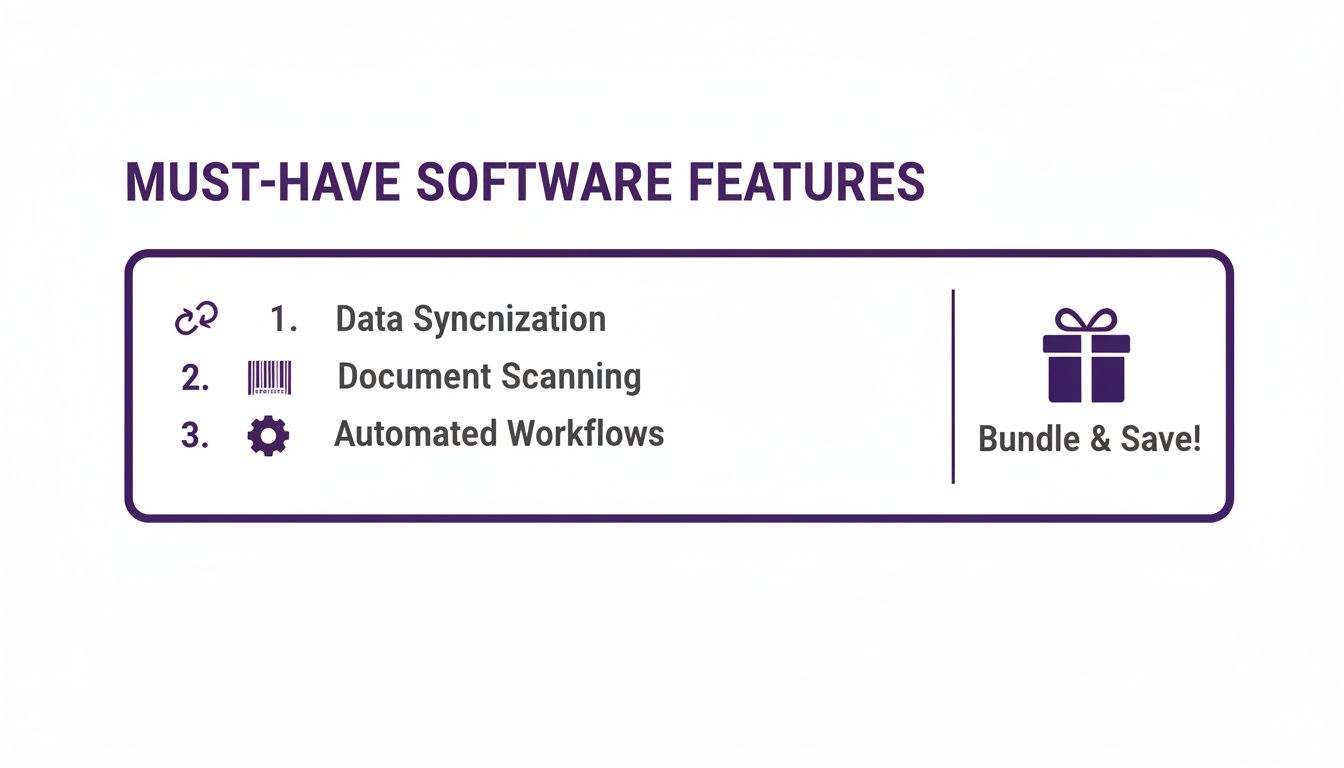
This image really nails the essentials. At its heart, a great inventory system needs to sync your stock everywhere, make counting and receiving foolproof with scanning, automate the boring stuff, and handle promotions like bundles. These four pillars are what separate a functional system from a truly powerful one.
The All-Rounder for Growing Brands
Some platforms are built from the ground up to be the central hub for rapidly expanding businesses. They pack a serious punch with a deep feature set designed to handle the complexity that comes with more sales channels, multiple warehouses, and even different currencies. These are often the best bet for stores that have outgrown simpler tools and need a more robust command center.
Take Cin7, for example. It’s a popular choice for brands that juggle inventory across their online store, marketplaces like Amazon, and even brick-and-mortar locations. Its real strength is tying every part of your operation together—from purchasing and receiving stock to managing B2B wholesale orders and integrating with 3PLs.
What really sets a tool like this apart is its holistic view of your entire supply chain. It’s not just about counting what’s on the shelf; it’s about mastering the flow of goods from your supplier all the way to your customer's doorstep.
Key Differentiator: Platforms in this category are all about connected commerce. They act as a central nervous system, pulling in data from sales, warehousing, and logistics to give you a single, unified view of your business's health.
Imagine a brand that sells on Shopify, runs a wholesale portal for B2B customers, and also uses Amazon FBA. A comprehensive solution makes sure an order from any of those channels is processed correctly, inventory levels are updated everywhere in an instant, and new purchase orders are triggered based on total demand—not just what’s happening on your website. That’s the kind of integration that prevents chaos as you scale.
The Shopify-Native Specialist
If your business lives and breathes Shopify, then a native or deeply integrated app can feel like a seamless extension of the platform you already know. These solutions are laser-focused on creating a smooth user experience right inside the Shopify admin, which makes them incredibly intuitive for store owners.
Katana, for instance, gets a lot of love for its visual interface and strong focus on manufacturing workflows. This makes it a fantastic fit for brands that make their own products. It plugs right into Shopify, pulling in your products, orders, and customer data with almost no setup required. Because it's so tightly integrated, you can manage raw materials, work-in-progress, and finished goods all in one spot.
The big win here is simplicity and focus. Instead of trying to do everything for everyone, these tools solve a specific set of problems and do it exceptionally well.
- Manufacturing Orders: Easily create and track production runs, automatically deducting raw materials from your inventory as they're used.
- Shop Floor Control: A simple, clean interface lets your production team track their tasks and progress, giving you a real-time look at what's being made.
- Make-to-Order Workflows: Perfect for businesses that create products on demand, as it ties sales orders directly to your production schedule.
While they might not have the sprawling feature list of an enterprise-level system, their deep connection to a platform like Shopify creates a beautifully efficient workflow for the right kind of business.
The User-Friendly Option for Small Businesses
Not every shop needs a complex system built for a multinational corporation. Many businesses are just looking for a straightforward, affordable, and easy-to-use tool that absolutely nails the basics of inventory and order management. This is where tools designed for small businesses shine.
Zoho Inventory is a perfect example. As part of the bigger Zoho ecosystem of business apps, it offers a clean, no-fuss interface and a solid set of core features at a price that won’t break the bank. It's an excellent first step for businesses finally graduating from spreadsheets.
Its key strengths include:
- Multichannel Management: It plays nicely with Shopify, Etsy, Amazon, and eBay, letting you centralize your stock control.
- Order Fulfillment: It connects with major shipping carriers so you can print labels and track packages right from the app.
- Basic Serial & Batch Tracking: It gives you the ability to track items by serial number or expiration date, which is a must-have for electronics or consumable goods.
The real appeal of a solution like Zoho is its low barrier to entry. You can get up and running in no time without a complicated implementation process, making it a fantastic choice for businesses that need to solve their stock-tracking headaches today.
The Powerhouse for High-Volume Sellers
Once your order volume really starts to take off, the demands on your inventory system change dramatically. It's no longer just about tracking what you have; it’s about optimizing every single step of the fulfillment process for speed and accuracy. This is where the heavy hitters come in.
Think of systems like Sellercloud, which are engineered to handle thousands of orders a day across dozens of marketplaces. These platforms are built for scale, offering advanced features like predictive purchasing, sophisticated warehouse management tools, and highly customizable reporting.
The integration of inventory management software with major ecommerce platforms is a key driver of market growth. Leading companies such as Shopify (Canada), Oracle (United States), SAP (Germany), and Zoho (India) dominate with highly integrated platforms that streamline operations. This synergy enhances efficiency by automating stock updates and synchronizing sales channels.
For high-volume sellers, efficiency is measured in seconds. A powerful platform automates the repetitive, time-sucking tasks—from creating pick lists to bulk-generating shipping labels—freeing up your team to focus on growing the business instead of getting buried in manual data entry.
When you're looking at software, seeing a head-to-head comparison of how different tools handle similar problems can be a game-changer. For example, checking out a review like this Pledgebox vs. Backerkit comparison can give you great insight into how different platforms approach product fulfillment and quantity management.
Side-by-Side Feature Comparison of Leading Inventory Software
To help you visualize how these different types of tools stack up, here's a quick breakdown. This table compares how top inventory management tools handle the most critical ecommerce features, helping you quickly spot the best fit for your store.
As you can see, there’s no single winner—the "best" option is the one that aligns with your specific operational needs, whether that's advanced manufacturing or high-speed, multi-channel fulfillment.
Making Your Decision
Ultimately, the “best” software is the one that fits your workflow, your budget, and your plans for the future. An all-in-one powerhouse might be total overkill for a small business just starting out, while a simple tool will crumble under the pressure of a fast-growing brand.
Use this comparison as a starting point. Think about your biggest operational headaches right now, and then think about where you see your business in two or three years. The right choice won’t just solve today’s problems—it will give you a clear path to grow.
Integrating Software Without Disrupting Your Sales
You've picked your inventory management software—great. But now comes the part that really matters: plugging it into your business without breaking anything. A smooth integration is the difference between a sigh of relief and a week of chaos filled with sync errors, lost data, and unhappy customers.
The goal is to get your new system talking to your existing tech stack so seamlessly that your daily sales and operations don't even hiccup.
Think of this less like flipping a switch and more like a carefully planned operation. You need a solid plan to make sure every piece of your e-commerce puzzle—from your Shopify store to your accounting software—communicates perfectly. A well-executed integration saves you from countless headaches down the road and builds a real foundation for growth.
Preparing for a Seamless Transition
Before you touch a single API, a little prep work will save you a world of hurt. The single biggest mistake I see businesses make is rushing this part. If you take the time to clean up your data and map out your workflows before you start, you’ll sidestep the most common integration nightmares.
First, give your existing product data a serious audit. Are your SKUs consistent everywhere? Are your product descriptions, costs, and supplier details actually correct? Cleaning this up now means you'll import clean, trustworthy data from day one, not a mess you have to fix later.
Next, sketch out a simple map of your key workflows. Trace an order's journey from the moment a customer clicks "buy" on Shopify to the second it’s marked as shipped. This includes how it gets picked, packed, and how the financial data gets into a tool like QuickBooks. Understanding this path is crucial for configuring your new software to fit how your business actually runs.
The success of your software integration is 90% preparation and 10% execution. Taking the time to standardize your SKUs and map your fulfillment process before you start will save you countless hours of troubleshooting later.
This foundational work is especially critical in today's market. For instance, North America held a dominant share of over 40% in the global inventory management software market in 2024. This was largely driven by retailers investing heavily in automation and cloud platforms to get a handle on their operations. Cloud-based tools are growing the fastest, with a CAGR of around 14%, because their scalability and lower upfront costs are a perfect match for growing online businesses. You can find more details on these market trends if you're curious.
The Step-by-Step Integration Plan
Once your data is clean and your workflows are mapped out, it's time to get into the technical setup. A phased approach is always your safest bet. Don't try to do it all at once.
Connect Your Primary Sales Channel First: Start with your main storefront, which for most of our readers is Shopify. Use the software’s built-in integration or app to link the two. Your first priority is to get the product catalog syncing and make sure new orders are being pulled into the inventory system correctly.
Test in a Staging Environment: Before you go live, run several test orders. Don’t just buy one thing—purchase different product types. Try a single item, a bundled kit, and an item with several variants. Follow those test orders all the way through your fulfillment process to be absolutely sure inventory levels are updating correctly on both ends.
Sync Your Other Systems: After you’ve confirmed your main sales channel is working flawlessly, start connecting your other essential tools. This usually includes:
- Accounting Software: Link to QuickBooks or Xero to make sure sales data, purchase orders, and cost of goods sold are recorded accurately without manual entry.
- Shipping Solutions: Integrate with services like ShipStation to keep your label printing and fulfillment workflow running smoothly.
Go Live and Monitor Closely: Once everything is tested and connected, you're ready to go live. But don't just set it and forget it. For the first few days, keep a close eye on everything. Manually double-check a handful of orders each day to confirm everything is syncing exactly as it should. This vigilance lets you catch tiny issues before they snowball into major problems.
- Tiered Plans: This is the most popular setup. You'll see packages like "Basic," "Pro," and "Advanced," each unlocking more features and raising the limits on users, monthly orders, or the number of products you can manage.
- Per-Order Pricing: Some tools charge you based on how much you sell. This can be a great deal when you're just starting, but watch out—the costs can balloon unexpectedly once your sales pick up steam.
- Per-User Pricing: Here, you pay a flat fee for every person on your team who needs to log in. This is common in more sophisticated systems where you have distinct roles, like someone in the warehouse, another handling purchasing, and a third managing finances.
- What You Need: Your top priorities are dead-simple multichannel syncing, basic order management, and a clean, intuitive dashboard. You don’t need complex features for warehousing or manufacturing—that’s just noise.
- Plan Recommendation: Zero in on a tool with a solid, budget-friendly starter plan. Look for something that includes at least two sales channel integrations and offers a decent number of orders, maybe up to 500 per month, to get you started. Simplicity is your friend here.
- What You Need: You've graduated to needing advanced tools. Think multi-location inventory support, automated purchase ordering, and powerful reporting that helps you predict future demand.
- Plan Recommendation: It's time to look at the mid-to-upper-tier plans. Prioritize solutions that offer unlimited orders, dedicated warehouse management features, and real demand forecasting. The extra investment will easily pay for itself by making your operations more efficient and preventing lost sales.
Inventory Management Software (IMS): This is your brain. It answers the question, "What do I have and how much of it?" It's all about tracking stock levels in real-time, syncing those numbers across Shopify and Amazon, creating purchase orders, and handling things like product bundles. The goal is a single, trustworthy source of truth for your inventory count.
Warehouse Management System (WMS): This is your muscle. It answers the question, "Where is it and how do I get it?" A WMS deals with the physical movement of your products inside the warehouse. It optimizes picking paths, tells you which bin an item is in, and helps your team pack and ship orders faster.
By following this careful, step-by-step process, you can confidently integrate the best inventory management software for ecommerce into your business, creating a powerful, central hub for your operations without missing a single sale.
How to Choose the Right Plan for Your Business

Picking an inventory management plan isn't about finding the cheapest one on the list. It’s a strategic choice that has to make sense for where you are right now and where you want to be in a year. The perfect plan for a solo Etsy creator just dipping their toes into Shopify will be a massive headache for a fast-growing brand that's shipping hundreds of orders daily.
The trick is to find that sweet spot where the software’s features and pricing match your reality. To get there, you first need to get a handle on how these companies actually charge for their services and figure out which business profile best describes you.
Decoding Common Pricing Models
Most software companies use a few predictable ways to structure their pricing. Once you understand them, you can look right past the flashy monthly number and figure out what a tool will really cost you over time.
You'll almost always run into one of these three models:
Don't just compare the monthly subscription cost. A "cheaper" plan with a tight order limit could wind up costing you way more in overage fees than a higher-tier plan that gives you room to breathe. Always run the numbers based on what you expect your order volume to be six months from now.
Thinking ahead like this helps you avoid nasty surprise bills and ensures your investment actually supports your growth instead of penalizing you for it.
Matching a Plan to Your Business Stage
Your business is a moving target, and your software should be able to keep up. Let’s walk through a couple of common situations to see how different needs call for completely different plans.
Scenario 1: The Etsy Seller Branching Out to Shopify
You've built a great following on Etsy and are ready to launch your own Shopify store to really own your brand. Right now, your biggest worry is keeping your stock levels in sync across both channels so you don't accidentally sell the same handmade item twice.
Scenario 2: The High-Growth Shopify Brand
Your Shopify store is booming. You're juggling a high volume of orders every day, maybe even thinking about adding a second warehouse or bringing on a 3PL. You know you need to get smarter about forecasting so your best-sellers don't constantly go out of stock.
Got Questions? We've Got Answers
Picking the right inventory software isn't just about features; it's about how it will actually work for your business day-to-day. It’s totally normal to have questions about what you're getting into. Let's clear up a few of the most common ones we hear from e-commerce sellers.
How Long Does It Really Take to Set Up?
This is the classic "it depends" answer, but I'll give you the real-world breakdown. If you're a small shop with a straightforward product catalog on a single Shopify store, you could genuinely be live in a week or so. It's totally doable.
But for most growing businesses—the ones with thousands of SKUs, selling across multiple channels, and needing to pull in past sales data—you should plan for several weeks. The software part is usually fast; it's the prep work that takes time.
A little secret from the trenches: The biggest slowdown is always messy data. If your SKUs, supplier info, and product details are already clean and organized, you've just cut your setup time in half.
A rushed launch is a recipe for disaster. Take the time to plan it out and test everything thoroughly. You'll thank yourself later when your stock counts are actually accurate.
Wait, Isn't Inventory Management the Same as Warehouse Management?
Great question, and it's a super common mix-up. They're related, but they solve different problems.
Think of it like this:
While many of the best inventory management software for ecommerce options have some light WMS-style features, a full-blown WMS is usually for larger businesses with really complex warehouse operations.
How Do These Tools Handle Returns?
Returns can be a nightmare for your stock counts if not handled right. Thankfully, modern inventory systems have a clear process for this.
When a customer starts a return, the software typically creates a Return Merchandise Authorization (RMA). This tags the incoming item so it doesn't get lost in the shuffle.
Once you get the product back, you inspect it. Then, right inside the system, you can mark its status—is it good to go back into sellable stock? Is it damaged? Does it need a quick fix? This single step instantly updates your inventory levels, keeping everything accurate.
Ready to stop wrestling with spreadsheets and build a professional Shopify store that actually grows with you? At Wand Websites, we build high-performing websites that turn your hard work into more traffic and loyal customers. Let us handle the tech so you can get back to creating amazing products.
Find out how we can help you thrive at https://www.wandwebsites.com.
