
Top Best Ecommerce Platforms for Small Business in 2024

For most small businesses, Shopify gives you the quickest, most straightforward way to get an online store up and running. It's an all-in-one package that just works. But, if you're already familiar with WordPress, then WooCommerce offers a level of control and customization that's tough to beat.
Picking between them isn't just a technical choice; it's a strategic one that will shape how you grow, how your customers shop, and how you manage your day-to-day.
How to Choose Your Ecommerce Platform
Getting your online store off the ground is a huge milestone, but choosing the right platform can feel completely overwhelming. This decision goes way beyond just picking a website builder—you're essentially choosing a long-term partner for your business. The platform you land on will affect everything from your daily workflow to your ability to scale down the road.
The ecommerce world is absolutely exploding, which shows just how essential these tools are. The global e-commerce platform market was valued at around USD 9.40 billion in 2024 and is expected to balloon to an estimated USD 45.60 billion by 2033. This incredible growth is driven by small businesses just like yours jumping into online sales to stay competitive.
Key Factors in Your Decision
To find the right ecommerce platform, you need to look past the shiny features and get down to what really matters for your business. Let's break it down into four core areas:
- Your Technical Comfort Level: Be honest with yourself. Are you a total beginner who needs a simple, guided setup, or are you okay with managing your own hosting and tweaking a bit of code?
- Your Budget: Don't just look at the monthly price tag. Think about the total cost of ownership—that includes monthly fees, transaction percentages, and any extra money you'll spend on essential apps or plugins.
- Scalability Needs: Where do you see your business in a year? Or five? If you plan to add hundreds of products, sell in different countries, or handle inventory across multiple locations, you need a platform that won't hold you back.
- Operational Integration: An online store is more than a website. Think about how the platform handles the real-world stuff, like payment processing, inventory management, and the different small business shipping solutions you'll need to use.
Here's the thing: choosing a platform isn't about finding the single "best" one. It's about finding the right fit for your specific business goals, budget, and skills. An all-in-one solution is perfect for getting to market fast, while a self-hosted option might give you more freedom in the long run.
To help you get a clearer picture, I've put together a quick comparison of the top players in the game.
Top Ecommerce Platforms at a Glance
This table gives you a high-level look at the leading platforms, so you can quickly see where each one shines and who it's built for.
Think of this as your starting point. Now, let's dive deeper into what makes each of these platforms tick.
Shopify: The All-In-One Store Builder
When a small business decides to jump into online selling, Shopify is almost always the first name that pops into conversation. There's a good reason for that. It was built from the ground up to be a complete, all-in-one solution, designed to take you from a simple idea to your very first sale as quickly and smoothly as possible.
This approach makes it one of the absolute best ecommerce platforms for small business owners who just want to get up and running. If you value speed and simplicity over getting bogged down in technical details, Shopify is probably for you. The heart of its appeal lies in its incredibly clean dashboard. Everything you need—from adding products to managing inventory and fulfilling orders—is right there in one easy-to-find spot. You don’t need any background in web design or coding to get started.
This simplicity is a lifesaver for direct-to-consumer (DTC) brands that need to launch now. Think about a creator who’s built a following on social media and wants to strike while the iron is hot. With Shopify, they can pick a great-looking theme, upload their products, and be ready to take payments in a single weekend.
The platform's dominance is undeniable. In 2025, Shopify holds a 10.32% share of the global e-commerce market. It's especially huge in the United States, where it's used by roughly 29% of all online merchants. With around 4.8 million active stores worldwide, its popularity speaks for itself. You can discover more insights about Shopify's market share and what that means for sellers.
Seamless Integration for Online and Offline Sales
One of Shopify’s biggest wins is how it seamlessly blends online and in-person sales with Shopify POS (Point of Sale). This is a total game-changer for any business that has a physical footprint, whether that's a boutique, a pop-up shop, or a table at a weekend market.
Instead of trying to sync two separate systems, Shopify POS handles it all automatically. Sell an item in your store, and your website's inventory updates in real-time. This simple feature prevents the nightmare of accidentally selling an out-of-stock product online. It just makes running your business so much less stressful.
For instance, a local coffee roaster can sell bags of beans online for customers across the country while also using the Shopify POS app on an iPad for in-person sales at the cafe. All the sales data, customer info, and inventory levels live in one place, giving them a crystal-clear view of their business's health.
The Power of the App Marketplace
While Shopify is solid right out of the box, its true strength is its massive App Store. With over 8,000 apps, you can bolt on almost any feature you can dream up without touching a line of code. This ecosystem lets your store grow right alongside your business.
- Marketing Automation: Plug in an app like Klaviyo to create sophisticated email campaigns based on how customers shop.
- Customer Loyalty: Integrate tools to build rewards programs that keep people coming back.
- Subscription Models: Set up recurring revenue by offering your products on a subscription basis.
Think of the Shopify App Store as building with LEGOs. You start with a really strong base, then add specialized pieces as you need them, whether that’s for better analytics, customer reviews, or dropshipping integrations.
Here's a look at Shopify's clean, inviting homepage, which really drives home how easy it is for entrepreneurs to get started.

The design immediately makes building a business feel accessible, nudging users to start a free trial and showing off its complete toolset.
But here's the catch: this reliance on apps is where the costs can start to add up. The base subscription plans are clear, but many of the best apps have their own monthly fees. It's really important to budget for these add-ons. Just a few "essential" apps can easily increase your total monthly cost well beyond the price of your Shopify plan.
WooCommerce: Tapping into WordPress for Ultimate Control
While all-in-one platforms are fantastic for their simplicity, some entrepreneurs want something more: complete control. If you're already familiar with WordPress or you just can't stand the idea of creative limits, WooCommerce is your best bet. It's not a separate platform but an open-source plugin that bolts right onto your WordPress site, turning it into a powerful online store.
That distinction is everything. Instead of "renting" space on someone else's platform, WooCommerce lets you build the store right into your own digital property. This is a game-changer for content-first businesses, like a blogger who decides to sell merch or a consultant who wants to offer digital downloads alongside their services.
And the numbers show just how popular this approach is. As of 2025, WooCommerce powers a staggering 39.05% of all online stores across the globe. That's nearly four times the market share of Shopify, a dominance built on its deep roots within the WordPress ecosystem. This integration gives merchants a level of freedom that's tough to find elsewhere. You can dig into the global ecommerce platform market data to see just how it maintains its top spot.
Unmatched Flexibility and Customization
The real magic of WooCommerce is one word: freedom. Since it’s open-source, you can tinker with just about anything. Want to set up complicated product variations, design a completely unique checkout flow, or add a niche feature you dreamed up? You can do it here.
This is all possible thanks to the enormous world of WordPress themes and plugins. There are thousands upon thousands of options out there to help you nail down every last detail.
- Themes: You can find a design for any vibe, whether you're building a clean, minimalist portfolio or a sprawling multi-vendor marketplace.
- Plugins: If you can imagine a feature, there's probably a plugin for it—from complex booking calendars to subscription models and interactive product customizers.
For the business owner who constantly thinks, "I just wish my store could do this," WooCommerce is almost always the answer. It’s the go-to for building a truly one-of-a-kind shop without hitting a creative or technical wall.
Think about a small business that sells custom-engraved jewelry. With WooCommerce, they could easily add a plugin that lets customers type their message on the product page, see a live preview of the engraving, and even have the price update based on the character count. Trying to pull that off on a more rigid platform would be a massive headache, if not impossible.
Understanding the Trade-Offs
Of course, all that power comes with a healthy dose of responsibility. Unlike a platform like Shopify that handles all the technical nitty-gritty for you, a WooCommerce store is self-hosted. That means a few key tasks land squarely on your plate.
You’ll be in charge of finding your own web hosting, installing an SSL certificate to keep your site secure, and staying on top of software updates and backups. Good hosting providers make this stuff pretty straightforward, but it’s still on you. If your site goes down, it’s up to you to figure out why or hire a developer to sort it out.
This hands-on approach is why WooCommerce shines for small business owners who are either comfortable with tech or have the budget to bring in help. While the plugin itself is free, the costs for good hosting, a premium theme, and must-have plugins can add up, so be sure to map out your budget from the start.
A Practical Comparison for Your Business Needs
Choosing the right e-commerce platform isn't about finding the one with the longest feature list. It's about figuring out which one fits your business, your budget, and your technical comfort level. Let’s cut through the marketing fluff and put the top contenders head-to-head.
We'll focus on what really matters when you're just starting out: How painful is the setup process? What’s this really going to cost in the first year? And can it grow with you without giving you a massive headache down the road?
Unboxing the Onboarding Experience
For anyone launching their first online store, the initial setup is where the rubber meets the road. This is where you immediately see the fundamental differences between a platform like Shopify and a solution like WooCommerce.
Shopify’s whole approach is to get you selling, fast. From the moment you sign up, it’s a guided, step-by-step process. Add a product, pick a theme, set up your payment options—it’s all laid out in a simple checklist. You never have to think about web hosting, security certificates, or server settings because Shopify handles all of that for you.
WooCommerce, on the other hand, puts you in the driver's seat from the very beginning. It’s a plugin for WordPress, so your journey starts with choosing a hosting provider, buying a domain, and installing WordPress itself. Only then can you install and configure WooCommerce. This offers incredible freedom but can feel overwhelming if you're new to building websites.
Key Insight: Your choice here comes down to a simple trade-off. Do you want the fastest path to market with a guided, all-in-one system (Shopify), or do you prefer to build your store on your own digital real estate with complete control from the ground up (WooCommerce)?
This chart gives you a quick visual on how different platforms manage transaction fees and payment gateways, two critical cost factors for any small business.
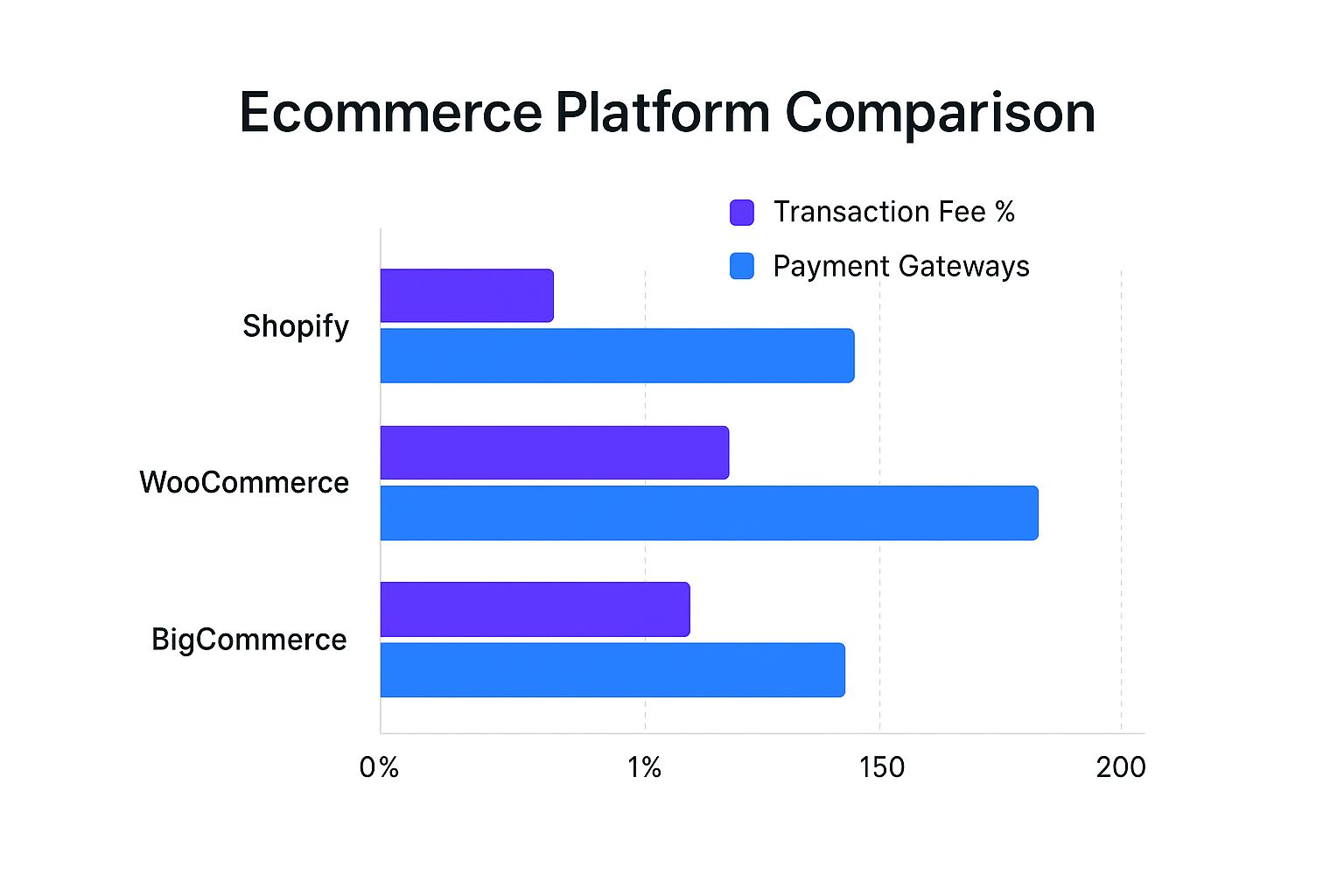
As you can see, platforms like BigCommerce build in their own payment processing to eliminate extra fees, while WooCommerce's open-source nature gives you access to a massive ecosystem of payment processors.
Deconstructing the True First-Year Cost
The advertised price is almost never what you actually end up paying. To get a real sense of the investment, you have to account for all the little—and not-so-little—costs that pop up over the first year.
Let’s run the numbers with a side-by-side comparison to see how a typical first year might look.
Feature & Cost Breakdown Shopify vs WooCommerce
This breakdown shows that while Shopify’s monthly subscription seems higher, a well-equipped WooCommerce store requires an upfront investment in hosting and premium plugins. The real difference is how you pay: a predictable monthly bill with Shopify versus a more self-managed, à la carte approach with WooCommerce.
Navigating Scalability and Growth Pains
Scalability isn't just about handling more traffic—it’s about how the platform adapts as your business gets more complex. This is where you see the long-term value of your choice.
With Shopify, growing is pretty straightforward. As sales pick up, you just upgrade to a higher-tier plan to get better features and lower transaction fees. The best part? You never have to worry about your site crashing during a Black Friday rush because Shopify manages all the technical heavy lifting. The main constraint is that you're always within Shopify's ecosystem.
Scaling a WooCommerce site is a totally different ballgame. The sky's the limit for customization, but you're responsible for making it all work. As you grow, you'll need to upgrade your hosting, maybe add a Content Delivery Network (CDN), and keep your database optimized. These aren't beginner tasks and often mean hiring a developer, which can be a significant and unpredictable expense.
What About Other Top Ecommerce Platforms?
Shopify and WooCommerce might get all the headlines, but they're definitely not the only game in town. A few other heavy hitters bring unique strengths to the table, and one of them might just be the perfect fit for your small business. These alternatives often shine in specific areas, whether it's giving you total design freedom or helping you manage a massive product catalog.
Taking a moment to look at these other options is a smart move. You don't want to miss out on a platform that feels like it was built just for you.

Wix: For When You Need Total Creative Control
If you're a visual person who wants to control every single pixel without touching a line of code, you need to look at Wix. It started life as a general website builder, but its e-commerce tools have become seriously impressive, making it a solid choice for boutiques, artists, and even local restaurants.
The real magic of Wix is its drag-and-drop editor. Unlike other platforms that lock you into predefined sections, Wix gives you a true blank canvas. This is a dream come true for a small business owner who wants a completely custom-looking site without the designer price tag.
- Who it's for: A business owner who puts design flexibility first, like a photographer selling prints or a consultant marketing digital courses.
- Pricing: You can get started with an e-commerce plan for around $29 per month.
- Key Feature: The unstructured editor. It lets you place anything, anywhere, giving you creative freedom that's hard to find elsewhere.
BigCommerce: Built for Big Inventories
BigCommerce is engineered for growth, plain and simple. It’s an absolute powerhouse for businesses with a large, complex inventory—or those planning to have one. While other platforms make you rely on apps for advanced features, BigCommerce packs an incredible amount of functionality in right from the start.
This "batteries included" approach is its biggest selling point. You get powerful tools for product variations, faceted search (letting customers filter by size, color, brand, etc.), and multi-channel selling without paying extra. That can save you a small fortune in monthly app fees compared to the competition.
BigCommerce is what you choose when you know you're going to scale. Its greatest strength is handling complexity without nickle-and-diming you for every essential feature.
This makes it a fantastic match for any business that's serious about scaling. Think of an auto parts store with thousands of SKUs and complex filtering needs—that's a business that would thrive on BigCommerce. The platform is built to handle that kind of load without breaking a sweat.
Squarespace: For Brands That Need to Look Stunning
Squarespace built its entire reputation on beautiful, design-forward templates. If aesthetics are at the heart of your brand—think artists, designers, and high-end craft makers—it’s often the best choice you can make. The platform is famous for its clean, modern themes that make products look absolutely incredible.
It may not have the raw e-commerce muscle of BigCommerce or the sprawling app store of Shopify, but it's a master at creating an elegant, professional online shop with very little fuss. For many creative businesses, its built-in marketing tools and straightforward inventory system are more than enough.
A furniture designer selling a curated collection, for example, would find Squarespace’s templates perfect for creating a high-end, gallery-like experience that lets their work shine.
Here’s a quick breakdown to help you see how these fantastic alternatives stack up:
Ultimately, looking beyond the biggest names can help you find a platform that’s a much better match for your specific goals. The best e-commerce platform for your small business might be one you hadn't even considered.
Picking the Right Platform for You
Okay, we've laid out all the details. Now it's time to make a call. The truth is, there's no single "best" platform for every small business. The right choice is the one that fits your specific budget, technical comfort level, and future plans.
To get started, be honest with yourself. What's your real budget for the first year? Don't just think about the monthly subscription; factor in potential costs for apps, themes, or hosting. Also, how much time can you realistically spend managing the technical side of your site versus actually selling your products? Answering these two questions will cut your options down significantly.
Align Your Choice With Your Business Goals
Your answers should point you in a clear direction. This isn't about finding the objectively best platform—it's about finding the best one for you.
Go with Shopify if you need to launch fast and keep things simple. If your goal is to get your store live this weekend without any technical headaches, this is your best bet. It’s an all-in-one solution that lets you focus on marketing and making sales, not managing servers.
Go with WooCommerce if you crave total control and want to build a content-heavy brand. If you already love WordPress or want the absolute freedom to create a unique customer experience from the ground up, this is the way. It’s perfect for those who don’t mind a more hands-on approach to build their digital home.
The right platform should feel like a powerful tool that works for you, not another full-time job you have to manage. It clears the path so you can stop worrying about the tech and start focusing on growth.
Once you’re set up, your next step is bringing in customers. A great place to start is by learning some powerful eCommerce strategies to boost online sales and get that initial momentum.
Ultimately, both Shopify and WooCommerce can lead to a thriving online business. The secret is to choose the path that removes the most friction from your day-to-day. Whether that's the streamlined security of Shopify or the endless creative freedom of WooCommerce, you can now make your decision with confidence. You’ve got this.
Got Questions? We’ve Got Answers.
Jumping into the world of ecommerce can feel like learning a new language. It’s totally normal to have questions! We've tackled some of the most common ones we hear from small business owners to help you feel confident about your next move.
Which Platform Is Easiest For Beginners?
If you're new to all this, you'll want a platform that doesn't feel like a full-time IT job. For anyone who isn't a tech wiz, I almost always point them toward Shopify, Wix, or Squarespace.
These platforms were built from the ground up for people without a technical background. Think intuitive dashboards and visual drag-and-drop editors. You can get a professional-looking store up and running without ever touching a line of code.
What’s The Cheapest Way To Start Selling Online?
This is a bit of a trick question. While WooCommerce is technically a free plugin, the total cost is never zero. You still have to pay for your own hosting and domain name, which will set you back at least $15-$40 per month to get started.
On the other hand, a platform like Shopify has all-inclusive plans starting at $29 per month, with hosting and all the essentials baked right in. This makes your costs predictable. So, for the absolute lowest cash out of pocket right now, a lean WooCommerce setup often wins.
The Bottom Line: A "free" platform like WooCommerce comes with necessary expenses like hosting and security. An all-in-one platform like Shopify bundles these into a single monthly fee, which can make budgeting a whole lot simpler.
Can I Switch Platforms Down The Road?
Yes, you can absolutely move your store later, but I'll be honest—it can be a real headache. Migrating means transferring all your product data, customer information, and order history from one system to another. It's a complex process.
While there are plenty of tools and services that can help, it’s a delicate operation. One wrong move could lead to lost data or a hit to your SEO rankings. My best advice? Try to pick a platform that you can see yourself growing with from the very beginning.
Ready to build a website that not only looks fantastic but also becomes your best salesperson? Wand Websites specializes in crafting high-performing Shopify stores for ambitious sellers ready to scale. Let us handle the tech, so you can focus on what you do best—running your business. Get your conversion-focused website today.
