
Finding the Best CRM for Ecommerce Growth

When you start looking for the best CRM for ecommerce, a few names pop up again and again: Klaviyo, HubSpot, and Zoho. They’re popular for a reason—they offer slick integrations and powerful marketing automation. But here's the thing: the right choice really boils down to your store's size and what you're trying to achieve. If you're all-in on Shopify, Klaviyo might feel like a natural fit, while HubSpot gives you an incredible runway with its free plan.
Why a CRM Is Your Next Ecommerce Power-Up
Running an online store can feel like a constant juggling act. You've got customer emails, order histories, and marketing campaigns all flying at you. It doesn't take long for spreadsheets and basic email lists to start cracking under the pressure. This is precisely the moment a dedicated Customer Relationship Management (CRM) system shifts from a "nice-to-have" tool to the core engine of your growth.

Stop thinking of a CRM as just a fancy address book. It's more like the central command center for every single customer interaction. It meticulously pulls together data from every touchpoint—your website, social media, past orders—and organizes it all into a single, clean, and incredibly useful profile for each shopper.
A Single Source of Truth
Imagine no more jumping between Shopify to check order history and your email app to see if a customer opened your last campaign. A CRM lays it all out on one screen. This complete "Customer 360" view is the secret sauce for making smarter, more profitable decisions. For a great overview of what these systems can do, you can explore some general CRM resources and insights.
This unified approach isn't just about convenience; it delivers real results. Across the board, businesses that implement a CRM see serious gains. We’re talking about industry reports showing revenue bumps of around 29% and productivity soaring by nearly 34%. It all comes down to smarter lead management and automated follow-ups—two things that are absolute gold for an online store.
With all your data in one place, you can finally:
- Launch Personalized Campaigns: Easily segment customers based on what they've bought (or haven't bought) to send offers that actually feel relevant. Think "customers who bought Product X but not Product Y."
- Improve Customer Service: Give your support team the full picture. When they can see a customer's entire order history instantly, they can solve problems faster and with way more context.
- Boost Lifetime Value: Pinpoint your most loyal customers and create automated campaigns to reward them, making them feel valued and keeping them coming back.
Top Ecommerce CRM Platforms at a Glance
Before we get into the nitty-gritty, here's a quick snapshot of the platforms we’ll be breaking down. Think of this as the "cheat sheet" to help you quickly see where each CRM shines.
This table gives you a starting point. Now, let's dive deeper to see which one truly fits the way you do business.
What to Look For in an Ecommerce CRM
Picking the right CRM for your online store isn't about finding the one with the most bells and whistles. It’s about zeroing in on the features that actually solve the real-world problems you face as a seller. Before we dive into comparing specific platforms, let's get clear on the absolute must-haves—the things that separate a generic contact database from a tool that can genuinely grow your business.
First and foremost, a great ecommerce CRM has to play nicely with your store. It should feel like a natural part of your setup, not some clunky software you have to fight with. That means deep, seamless integrations with platforms like Shopify, WooCommerce, or BigCommerce. If you’re stuck manually exporting CSV files, you’re not just wasting time; you’re creating data-sync headaches and getting a fractured picture of your customers.
Unified Customer Profiles
The bedrock of a solid ecommerce CRM is its ability to build a unified customer profile. I'm not just talking about a digital Rolodex with a name and an email. This should be a dynamic, living record of every single touchpoint a customer has with your brand.
A genuinely unified profile automatically stitches together:
- Complete Order History: What they bought, when they bought it, and how much they’ve spent over time.
- Website Activity: Which pages they’ve visited, the products they’ve lingered on, and how they navigate your site.
- Marketing Engagement: The emails they open, the links they click, and how they respond to your texts.
- Support Tickets: A full log of every conversation they've had with your customer service team.
Having this 360-degree view means your team can instantly understand a customer's journey, making every conversation and marketing message that much smarter and more personal.
Key Insight: Imagine your support agent seeing a customer’s recent browsing history right next to their past orders. They can shift from just fixing a problem to proactively offering personalized help that builds real loyalty.
Advanced Segmentation and Automation
Once you're collecting all this incredible customer data, you need powerful ways to use it. This is where advanced segmentation steps in. A top-notch ecommerce CRM lets you slice and dice your customer list into dynamic groups based on incredibly specific behaviors, going way beyond simple demographics.
Think about the possibilities. You could create segments like:
- "VIP customers who haven't placed an order in the last 90 days."
- "Shoppers who viewed the 'new arrivals' category three times this week but didn't buy."
- "First-time buyers who used a specific welcome discount."
These super-targeted segments are the fuel for powerful marketing automation. Once you’ve defined these groups, you can set up automated workflows to send the right message at the right time—think abandoned cart reminders, exclusive VIP offers, or personalized product recommendations that actually make sense.
Today's online retail world is built on flexible, cloud-based tools that connect everything in your tech stack. It's no surprise that 87% of all CRM systems are now cloud-based, a huge leap from just 12% back in 2008. With about 91% of businesses with 11 or more employees now using a CRM, the ecosystem of apps and expert help is fully mature and ready for stores looking to grow. You can find more stats and market trends over on Kixie.com.
Comparing the Top Ecommerce CRM Platforms
Picking the right CRM for your store isn't about finding the one with the most bells and whistles. It's about finding the platform that actually solves the problems you face every single day. Let's get real and see how the big names—HubSpot, Klaviyo, Salesforce, and Zoho—really perform when the rubber meets the road.
We’re going to walk through a few common situations every growing ecommerce brand has to nail. This is where you see the subtle, but critical, differences in how these platforms think, work, and ultimately, help you grow.
Scenario 1: Recovering Abandoned Carts
Abandoned carts are the low-hanging fruit of ecommerce. Studies show that nearly 70% of online shopping carts never make it through checkout. How a CRM handles this one simple task tells you a lot about whether it truly gets ecommerce.
Klaviyo's Approach
Klaviyo was practically born for this. Its Shopify integration is so slick that setting up an abandoned cart email series feels almost automatic. It pulls product images, prices, and links right into the email without you having to lift a finger. You can easily build out a multi-step flow with SMS messages and see exactly how much money each step is bringing back. It’s clean, simple, and incredibly effective.
HubSpot's Approach
HubSpot also has fantastic abandoned cart tools, especially if you’re on Shopify. It takes a little more tweaking to set up compared to Klaviyo's native feel, but its visual workflow builder is a dream to work with. The real magic happens when you start layering in other customer data. For instance, you could design a completely different abandoned cart sequence for your VIP customers, maybe offering a special discount that a brand-new shopper wouldn't get.
The Verdict
For pure, out-of-the-box ease and power, Klaviyo is the winner for most Shopify stores. But if you're looking to build more sophisticated, segment-based recovery campaigns, HubSpot gives you a much bigger and more flexible toolbox.
Scenario 2: Segmenting Your High-Value Shoppers
Let’s be honest: some customers are worth more than others. The ability to spot your best customers and treat them like gold is what separates good brands from great ones. This means your CRM needs to slice and dice your data based on real purchase history and lifetime value.
Salesforce's Power
This is where an enterprise-grade system like Salesforce Commerce Cloud really earns its keep. It can create mind-blowingly detailed customer segments using AI that can spot high-value shoppers you didn't even know you had. Think about building audiences based on predictions, like "customers likely to churn" or "shoppers who will probably love our next product launch." For big retailers juggling millions of records, this is next-level stuff.
Zoho's Flexibility
For a much more approachable price, Zoho CRM is surprisingly powerful here. You can create your own custom fields to track the exact metrics that define a "VIP" for your business. It might not have the fancy built-in AI of Salesforce, but its workflow rules are rock-solid. You can automatically tag customers as they hit certain spending levels or purchase milestones, making segmentation a breeze.
The Verdict
If you're a large-scale brand that needs AI-driven, predictive segmentation, Salesforce is in a league of its own. For small and mid-sized businesses that want deep customization without the enterprise price tag, Zoho CRM gives you all the tools you need to build powerful VIP programs.
Choosing the right platform often comes down to where you are right now and where you plan to go. This flowchart breaks down the decision into a few simple questions to get you pointed in the right direction.
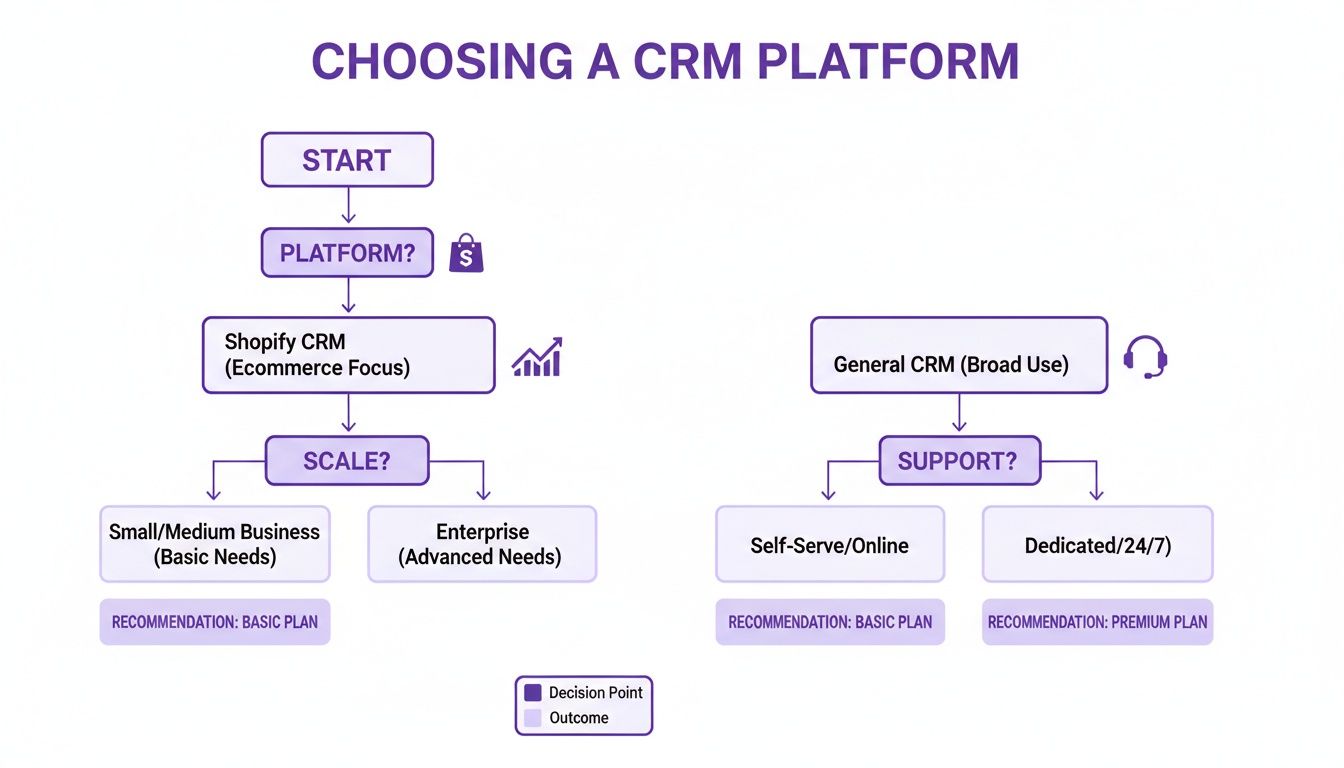
As you can see, the platform your store is built on (like Shopify) and your business's size are the best places to start when trying to narrow down the options.
To give you a clearer side-by-side view, let's break down how these platforms compare on the features that matter most to an ecommerce business.
Ecommerce CRM Feature and Integration Comparison
This table gives you an at-a-glance look at the core strengths and weaknesses of each CRM, focusing on what's truly important for online sellers.
This comparison highlights a key takeaway: there is no single "best" CRM. The right choice depends entirely on your business model, your primary sales channels, and your long-term goals.
Scenario 3: Launching a Customer Loyalty Program
A smart loyalty program is your secret weapon for turning one-time buyers into lifelong fans. A good CRM doesn't just track points; it uses that loyalty data to make your marketing even smarter.
Key Differentiator: The best platforms don’t just track points; they integrate loyalty status directly into every marketing campaign and customer service interaction, making your most valuable customers feel truly seen.
Klaviyo's Ecosystem
Klaviyo doesn't have its own built-in loyalty program, but that's actually a strength. It integrates beautifully with the best loyalty apps on the market, like LoyaltyLion and Yotpo. Once you connect them, you can use loyalty data—like a customer's VIP tier or points balance—to trigger special emails and texts. It just works.
HubSpot's All-in-One Approach
With HubSpot, you can build a more homegrown loyalty program using its custom objects and automation tools. It takes more work to set up, for sure. The big win, however, is that all your loyalty data lives right alongside your sales and marketing info, giving you one unified customer view. You could even create automated tasks for your team to personally call a customer the moment they hit a new VIP tier.
For a deeper dive into how two of the biggest players compare, a detailed comparison of Salesforce vs. HubSpot CRM can provide valuable insights into their strengths and weaknesses for different business needs.
The Verdict
If you want to plug in a best-in-class loyalty app and have it work flawlessly, Klaviyo's ecosystem is tough to beat. If you'd rather build something custom and keep all your data under one roof, HubSpot has the power tools you need to get it done.
Scenario 4: Managing Post-Purchase Support
Amazing customer service is how you stand out from the crowd. Your CRM should give your support team the full story on every customer so they can solve problems fast and keep people happy.
HubSpot's Service Hub
This is a standout feature for HubSpot. It rolls a full-blown support ticketing system right into the CRM. When a customer sends a message, your support agent instantly sees their entire history—every purchase, every page they viewed, and every email they opened. No more jumping between different apps. It makes for quick, smart, and personal support.
Zoho's Integrated Suite
Zoho’s strength is its suite of connected apps, including Zoho Desk for customer support. The link between Zoho CRM and Zoho Desk is seamless. This setup lets you create some really slick workflows between departments. For example, a ticket from a high-value customer could automatically be flagged for a manager, or a satisfaction survey could be sent out the minute a ticket is closed.
The Verdict
For businesses that want their sales, marketing, and customer service teams working together in one system, HubSpot is a fantastic choice. For those who want the power of a dedicated support tool that plays nicely with a flexible CRM, the Zoho suite is a compelling and budget-friendly option.
Finding a CRM That Clicks with Your Ecommerce Platform
Let's be real: the "best" ecommerce CRM doesn't exist. The best one is the one that plugs into your store so smoothly you forget it’s a separate tool. A clunky integration will cause more problems than it solves, leaving you with jumbled data and hours of your life you'll never get back. The whole point is to match the CRM’s strengths with how your platform is built, so customer, order, and product info flows effortlessly.
The platform you use—whether it's the all-in-one convenience of Shopify or the open-source muscle of WooCommerce—pretty much dictates what you need from a technical standpoint. If you're on Shopify, you’ll probably want a CRM with a top-rated app you can install in one click. But if you’re running on WooCommerce, you'll be looking for something with a flexible API and plenty of room for customization.
For Shopify Merchants: Seamless Integration is Everything
If your store is on Shopify, your number one priority is finding a CRM with a deep, native integration. You need something that feels like a natural extension of your Shopify dashboard, not another clunky piece of software you have to fight with every day. This is especially true for founders who aren't super technical and just need their tools to work.
Keep an eye out for CRMs that offer:
- Two-Way Data Sync: When a customer's info, order history, or even the product catalog changes, it should update automatically in both your CRM and Shopify. This is non-negotiable if you want your marketing segments to be accurate.
- Pre-Built Automation Triggers: The integration should come with out-of-the-box triggers for all the usual ecommerce stuff—abandoned checkouts, first-time purchases, order confirmations, and so on.
- A Solid Shopify App Store Presence: A high-quality app in the Shopify App Store is a great sign. It shows the CRM developer is serious about supporting Shopify merchants.
A Practical Tip: For most Shopify stores, especially those heavily invested in email and SMS marketing, a platform like Klaviyo is often the path of least resistance. Its integration is so tight it can pull product details right into your emails and texts with almost no setup, which is a massive time-saver for busy owners.
For WooCommerce Users: Flexibility is the Name of the Game
WooCommerce is built on WordPress, which means you have incredible freedom and control over your store. The perfect CRM for a WooCommerce site should reflect that same flexibility. You’re not just looking for a simple integration; you’re looking for a partner you can shape to fit your unique business workflows.
This means you should be prioritizing CRMs that are built for customization and thrive in an open-source world. You’ll want a system that lets you create custom data fields to track specific customer details or product information that’s unique to your business.
Look for CRMs with these traits:
- Strong API Access: A well-documented API is a must. It gives your developers the power to build custom connections and data syncs between WooCommerce and your CRM.
- Customizable Modules: Platforms like Zoho CRM really shine here. They let you build out entire modules from scratch that perfectly match your business logic.
- A Healthy Plugin Ecosystem: Before you decide, poke around the WordPress plugin repository. See if there are official or well-regarded third-party connectors that can bridge the gap between your store and your top CRM choices.
What "Data Syncing" Actually Means
"Data syncing" sounds straightforward, but the devil is always in the details. A shallow integration might just pull a customer's name and email. A deep one, however, will grab their entire order history, marketing consent status, and even custom fields from their Shopify or WooCommerce profile.
Before you commit to a CRM, ask some pointed questions about the integration. Does it sync all your past order data, or just new orders from this point forward? How fast does a customer's profile update after they buy something? A delay of just a few minutes can be the difference between a timely "thank you" email and a totally missed opportunity. Getting this detail right is what separates a good ecommerce CRM from a great one.
Your Go-Live Checklist for a New Ecommerce CRM
Picking out the perfect CRM is a huge win, but the real work—and the real payoff—begins when you set it up. A smooth launch is what turns that shiny new software into a growth engine for your store instead of just another confusing chore for your team. This checklist will walk you through the essential steps to get everything running right from day one.

Think of this as more than just a technical setup. It's your chance to do a serious spring cleaning of your customer data and really sharpen your marketing strategies. Nail these foundational steps, and you'll start seeing a return on your investment almost immediately.
Phase 1: Prepare Your Data for Migration
Before you even think about moving a single contact, you have to get your existing customer data in order. Trust me, migrating a messy, outdated list is a recipe for disaster. It leads to bounced emails, wildly inaccurate reports, and a whole lot of frustration. This is your moment for a fresh start.
Your first move is a full-on data audit. Export your customer lists from wherever they live now—whether that's Shopify, Etsy, or an old email tool like Mailchimp—and get them into a spreadsheet.
Now for the cleanup:
- De-dupe Everything: Hunt down and merge any duplicate entries. You want every customer to have one single, unified profile.
- Fix Formatting Issues: Standardize your data. Think capitalizing names properly and making sure all phone numbers follow the same format.
- Archive Inactive Contacts: Got contacts who haven't opened an email or bought anything in years? It might be time to move them to an archive list. This will improve your email deliverability and can even lower your subscription costs.
Once your list is sparkling clean, it's time to map your data fields. This is simply the process of telling your new CRM where to put the old information. For example, you need to match the "First Name" column from your spreadsheet to the "First Name" field in your new CRM. This is absolutely critical for keeping your valuable customer history intact.
A Word of Advice: Data mapping is hands-down the most crucial part of any CRM migration. If you rush this, you risk losing order histories and breaking customer segments, which defeats the entire purpose of getting a new system. Take your time and double-check everything.
Phase 2: Configure Integrations and Automations
With clean data ready to roll, it's time to connect the dots. Your CRM is meant to be the central hub of your business, so it needs to talk to all the other tools you use every day. Start by connecting it to your ecommerce platform, like Shopify or WooCommerce, to get that real-time sync of customer and order data flowing.
Next, link up your other essential marketing and support tools. This could be your social media accounts, your help desk software, or any analytics platforms you rely on. The goal is to create a seamless flow of information that gives you that all-important 360-degree view of your customers.
Once the integrations are live, start building out your first few automations. Don't go crazy trying to build a dozen complex workflows right away. Just start with the basics that will give you the biggest bang for your buck:
- The Welcome Series: Set up an automated 2-3 email sequence for new subscribers. This is your chance to introduce your brand and maybe offer a small discount.
- Abandoned Cart Recovery: This one's a must. Create a simple reminder email (or even an SMS) that goes out a few hours after someone leaves items in their cart.
- Post-Purchase Follow-Up: Automate a quick "thank you" email to confirm the order and let them know what to expect with shipping.
These initial automations act as a safety net, ensuring you're hitting all the key customer touchpoints while you and your team get comfortable with the new system. This is where you really start to see how the best CRM for ecommerce can fit your brand's unique workflows.
Phase 3: Train Your Team and Set Your KPIs
A new tool is only as good as the people using it. Before going live, hold some training sessions that are tailored to what your team members will actually be doing. A customer service rep needs to know a different part of the system than your marketing manager does.
Finally, you need to decide how you're going to measure success. Fuzzy goals like "improve customer relationships" are impossible to track. You need to establish clear Key Performance Indicators (KPIs) that tie directly to your business goals.
Here are a few essential ecommerce KPIs to track in your new CRM:
- Customer Lifetime Value (CLV): How much revenue does the average customer bring in over their entire time with you?
- Repeat Purchase Rate: What percentage of your customers come back to buy again?
- Email Open and Click-Through Rates: Are your new automated campaigns actually getting engagement?
By setting these benchmarks before you launch, you'll be able to clearly see the impact your new CRM is having on the bottom line right from the very first month.
Common Questions About Ecommerce CRMs
Diving into the world of CRMs can definitely stir up a lot of questions. As you get closer to picking one, it’s smart to work through the common hang-ups and "what-ifs" that trip up most store owners. Getting straight answers now means you can choose with confidence and have a much easier time getting started.
Let's clear up some of the most common questions we hear from ecommerce entrepreneurs just like you.
Can I Use a Free CRM for My Small Ecommerce Store?
You absolutely can. In fact, it’s a great way to start. Many of the top players, like HubSpot and Zoho, have really solid free plans that are perfect for getting your feet wet. These plans usually give you the essentials: contact management, basic email tools, and a little bit of automation—everything you need to get your customer data in one place without spending a dime.
But you have to know what you're giving up. As your business grows, you'll inevitably hit a wall. The really powerful features—like advanced segmentation to find your repeat buyers, deep analytics, and crucial ecommerce automations like abandoned cart recovery—are almost always locked behind a paid plan.
Expert Tip: Think of a free CRM as a test drive. It’s a no-risk way to learn the platform and build good habits before you actually need to invest in the more powerful tools.
What Is the Difference Between a CRM and Email Marketing Software?
This is a fantastic question because the lines between them have gotten a little fuzzy. A classic email marketing tool, like Mailchimp, is designed to do one thing exceptionally well: send email campaigns to your subscriber lists. Its focus is on the "send."
A real ecommerce CRM does that, but it goes so much deeper. Its primary job is to create a complete, 360-degree profile of every single customer. It follows their entire journey with you—every purchase they've made, every support ticket they’ve submitted, every page they’ve visited on your site, and every email they’ve opened. All that rich, connected data lets you do some seriously personal marketing that a simple email tool just can’t touch.
For instance, a CRM can automatically send a special discount to a customer who has spent over $500 in the last six months and browsed a specific product category this week. That’s the magic of a CRM—it’s all about targeting based on real behavior.
How Long Does It Take to Migrate to a New CRM?
Honestly, the timeline for a CRM migration really boils down to the size and complexity of your store. Here’s a rough guide:
- For a small store with a few thousand customers and a straightforward Shopify integration, you could probably get the basics imported and set up in a week or so.
- For a larger business with a massive order history, lots of custom data fields, and several other tools to connect, you’re likely looking at a multi-week project.
The biggest factor, by far, is how much you prepare. Before you even think about hitting "import," block out time to clean up your existing customer lists, decide exactly which data fields you need to bring over, and sketch out your first few automation workflows. A little planning upfront prevents a lot of headaches later and ensures you start getting value from your new system right away.
Ready to build an ecommerce site that not only looks professional but is built to grow with you? At Wand Websites, we create high-performing Shopify stores that turn your hard work into more traffic and loyal customers. Let’s build your brand’s future, together. https://www.wandwebsites.com
